
Close Menu
    Facebook X (Twitter) Instagram
    Facebook X (Twitter) Instagram
    KahawatunguKahawatungu
    Button
    • NEWS
    • BUSINESS
    • KNOW YOUR CELEBRITY
    • POLITICS
    • TECHNOLOGY
    • SPORTS
    • HOW-TO
    • WORLD NEWS
    KahawatunguKahawatungu
    TECHNOLOGY

    Microsoft Adds Watermark Warning for Users Installing Windows 11 OS on Unsupported Hardware

    Francis MuliBy Francis MuliFebruary 23, 2022No Comments2 Mins Read
    Facebook Twitter WhatsApp Telegram Email
    Share
    Facebook Twitter WhatsApp Telegram Pinterest Email Copy Link

    Microsoft is testing a new warning for Windows 11 users who install the operating system on unsupported hardware. The latest Windows 11 OS is said to feature a new watermark alongside the desktop’s wallpaper with the warning repeated in the landing page of the settings app.

    The desktop wallpaper warning was discovered by a Twitter user earlier this month, but reports indicate that the tech giant might still be testing a number of additions to Windows 11 that might not make the final cut.

    If the OS has been uploaded on unsupported hardware, the user will see a watermark stating “System requirements not met” alongside the build number available on evaluation and pre-release versions of Windows.

    Read: Microsoft Unveils Windows 11 with Support for Android Apps, Free Upgrade
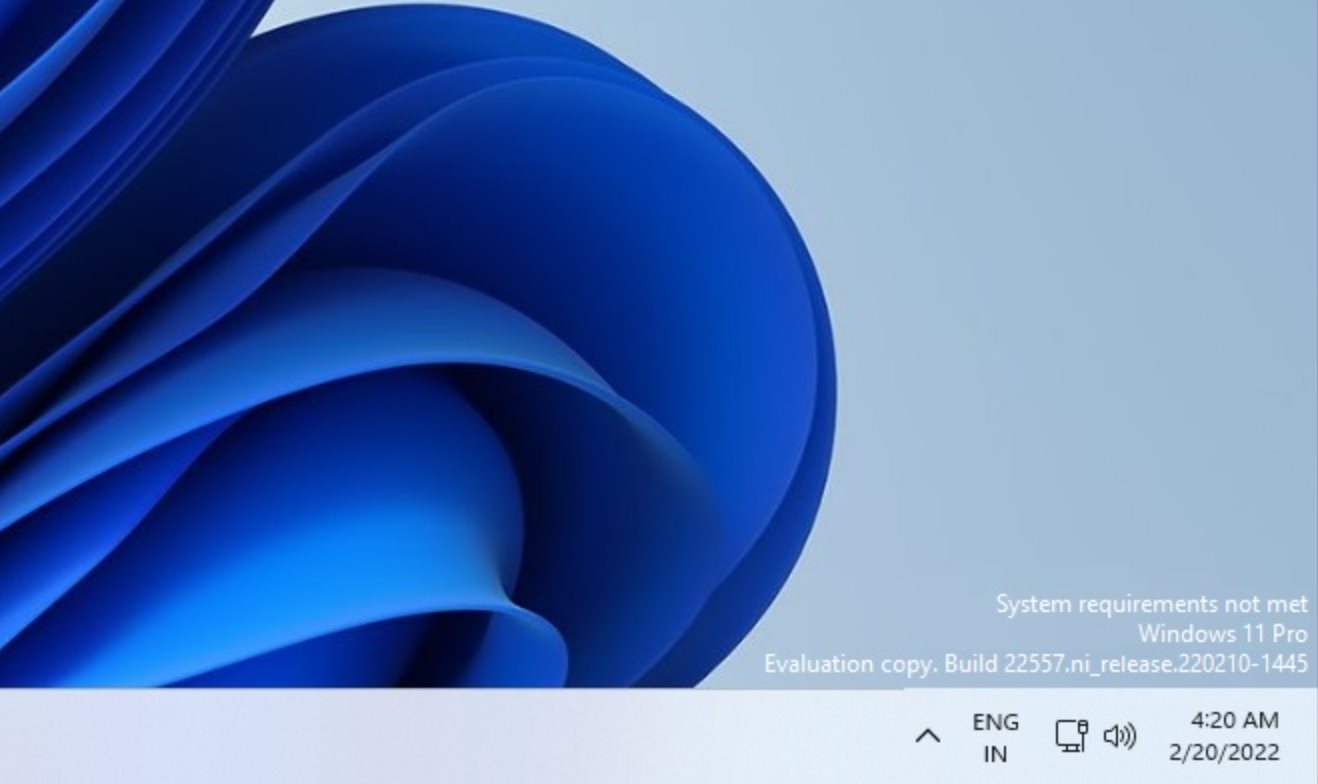
     

    Nonetheless, the new warnings are an indication that Microsoft intends to change the way Windows 11 looks on unsupported devices.

    Read also: Google to Take On Windows with New Chrome OS Version for Older PCs and Macs

    The minimal hardware requirements for Windows 11 have sparked debate as many PCs were left behind. The operating system only officially supports Intel 8th Gen Coffee Lake or Zen+ and Zen 2 CPUs and higher. However, there is a simple way to get around the restriction on unsupported devices and install Windows 11. Anyone who applies the workaround may now start seeing these warnings in future Windows 11 releases.

    The tech giant has applied similar warnings in the past for unactivated versions of Windows, restricting changes to features like dark mode, personalization settings, and themes until the system is activated. The company doesn’t appear to be experimenting with any feature limitations, and the warnings are now simply subtle, rather than pop-ups or notifications.

    Email your news TIPS to Editor@kahawatungu.com or WhatsApp +254707482874. You can also find us on Telegram through www.t.me/kahawatungu

    Email your news TIPS to Editor@Kahawatungu.com — this is our only official communication channel

    microsoft
    Follow on Facebook Follow on X (Twitter)
    Share. Facebook Twitter WhatsApp LinkedIn Telegram Email
    Francis Muli
    • Website
    • Facebook
    • X (Twitter)
    • Instagram
    • LinkedIn

    Follow me on Twitter @francismuli_ Email: Editor@Kahawatungu.com

    Related Posts

    Israel Issues Travel Advisory for Tanzania Ahead of Expected December 9 Demonstrations

    December 5, 2025

    Ndanyi named new Rift Valley police commander in changes

    December 4, 2025

    Meta starts kicking Australian children off Instagram and Facebook 

    December 4, 2025

    Comments are closed.

    Latest Posts

    Police Arrest Nine Suspected Gang Members in Kakamega

    December 5, 2025

    Israel Issues Travel Advisory for Tanzania Ahead of Expected December 9 Demonstrations

    December 5, 2025

    Parliament Vetts SRC CEO Nominee Ali Abdullahi Surraw

    December 5, 2025

    Cary-Hiroyuki Tagawa, actor who performed in ‘Mortal Kombat,’ dies at 75

    December 5, 2025

    Monique Lamoureux-Morando Siblings: Meet the Siblings Squad Behind the Ice Hockey Icon

    December 5, 2025

    Matthew Tkachuk Siblings: All About Brady and Taryn Tkachuk

    December 5, 2025

    10 Women Legislators Graduate from Parliamentary Gender Equality Programme

    December 5, 2025

    Tony Durant Siblings: Meet Kevin, Brianna and Rayvonne Pratt

    December 5, 2025
    Facebook X (Twitter) Instagram Pinterest
    © 2025 Kahawatungu.com. Designed by Okii.

    Type above and press Enter to search. Press Esc to cancel.