


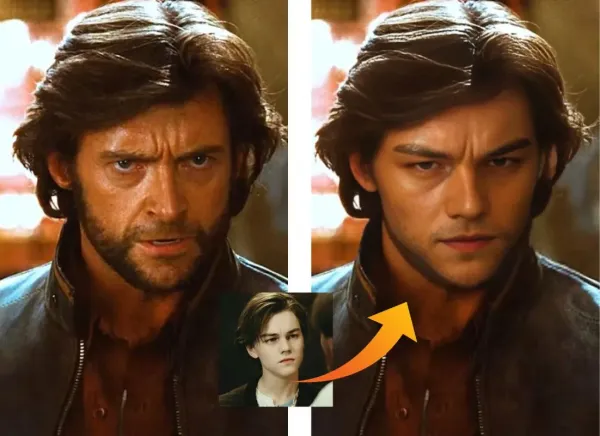
If you create creator style content, marketing creatives, or personal branding assets, two “identity” tasks come up constantly. Swapping faces for fun concepts or quick mockups. Generating clean, professional headshots without booking a shoot. These needs do not always overlap, so it is smarter to evaluate the tools separately, then choose what fits your use case.
Pick 1. Fast photo face swaps
For photo face swaps, speed and realism matter, but so does simplicity. Free photo Face Swap is positioned as a browser tool that supports face swaps across photos, videos, and GIFs, with no download and claims of no watermark.
Quick how to
- Upload the photo you want to edit, then upload the face photo you want to insert.
- Generate the swap, then review at full size for edge quality around hairline, glasses, and profile angles.
- If it looks off, try a clearer face input with better lighting and a more frontal angle. Many tools perform best on clean faces.
- Export the best result and keep it as a reusable asset for your next variations.
Competitor snapshot. Photo face swap
| Tool type | Good at | Where it struggles | Best for |
| BeArt style browser face swap | Quick swaps, no install workflow | Hard angles, heavy motion blur | Creators, marketers, quick concepts |
| Reface style apps | One tap face swaps on mobile Google Play+1 | Less control, app workflow | Meme content, casual fun |
| DeepSwap type suites | Photo, GIF, video swaps in one place DeepSwap AI | Can be “too much” if you only need photos | Multi format creators |
| Remaker face swap tools | Photo face swap plus batch options Remaker AI+1 | Interface varies by feature | Bulk experiments and batches |
Use responsibly
Only swap faces when you have consent, or when it is clearly parody or non-deceptive. Avoid using face swaps to impersonate someone for fraud, harassment, or misinformation.
Pick 2. Professional AI headshots in minutes
If your goal is LinkedIn, team pages, resumes, or consistent profile photos, a headshot generator is a different category than face swap. AI Headshot Generator focuses on producing realistic, professional headshots from a small set of selfies, it highlights uploading 1 to 4 selfies, choosing outfits and backgrounds, and getting results quickly. Quick how to
- Upload 1 to 4 clear selfies with varied angles and good lighting.
- Pick styles that match your real world use, for example neutral backgrounds for corporate profiles, or brighter looks for creator branding.
- Generate a set, then shortlist headshots that preserve your real facial features and avoid over smoothing.
- Final check. Look closely at ears, glasses edges, teeth, and any text like badges or logos, since generative tools can distort fine details.
Competitor snapshot. AI headshot generators
| Tool type | Good at | Where it struggles | Best for |
| Remaker headshot generator | Few selfie input flow, style choices, quick turnaround Remaker AI | Occasional artifacts in fine details | Individuals and teams needing fast headshots |
| Aragon type headshot tools | Customization like outfits and backgrounds Aragon.ai | Typically more steps and packages | Users who want many variations |
| HeadshotPro type services | Large batches of headshots from selfies | Input requirements and wait time vary | Business headshot volume |
| BetterPic type portrait tools | Portrait focused realism and customization BetterPic+1 | Can be feature heavy for simple needs | Studio style teams and brands |
Wrap up. Choose the tool that matches the outcome
Face swap is for creative identity content and fast concepts. Headshot generation is for credible, professional presence. If you are building a creator workflow, the easiest way to validate either tool is simple. Run one real asset you plan to publish this week, then repeat the same settings for a batch of five, consistency is what makes these tools truly valuable

Email your news TIPS to Editor@Kahawatungu.com — this is our only official communication channel
