

AIVector: The AI Vector Tool That Redefines Scalable Design

The AI Vector Tool That Redefines Scalable Design
The shift toward high-resolution screens, multi-platform branding, and responsive layouts has made scalable graphics a core part of modern design workflows. This article walks through how AIVector uses AI Vector generation to streamline the entire creative process from concept to final SVG output.
Understanding the Role of AI in Vector Creation
The First Step: Why Creators Need Smarter Vector Tools
Designers often begin with rough sketches, screenshots, or hastily written notes. These assets rarely meet production standards and typically require manual redrawing in conventional vector software. The introduction of the AI Vector workflow completely changes this stage. Instead of starting from scratch, creators can now feed simple text instructions or upload basic images and convert them into clean, editable SVG files. This shift eliminates repetitive redrawing and allows more time to refine creative direction rather than struggle with technical conversion.
From Bitmap to Scalable Output in a Single Pass
Many projects start with low-resolution logos, product icons, or website assets that were never originally designed as vectors. Traditional tools often fail to preserve clarity, especially when enlarging small bitmap images. AIVector handles this problem by analyzing the underlying edges and shapes, reconstructing them as mathematically precise paths. The output remains crisp whether it is displayed as a tiny app icon or a full-width banner on a 4K screen. The reliability of this process significantly reduces back-and-forth adjustments between design and development teams.
When Speed Matters in Daily Workflows
Fast-moving design environments do not allow long production cycles. Content creators handling landing pages, pitch decks, or social campaigns need assets ready within minutes, not hours. AIVector enables this accelerated flow by converting images or descriptions into vectors instantly. The consistent output quality means the assets can be dropped into design files or front-end code without additional cleanup. This speed becomes especially valuable in roles where designers and marketers share overlapping responsibilities.
How AIVector Transforms Textual Ideas Into Visual Assets
Turning Natural Language Into Editable SVG
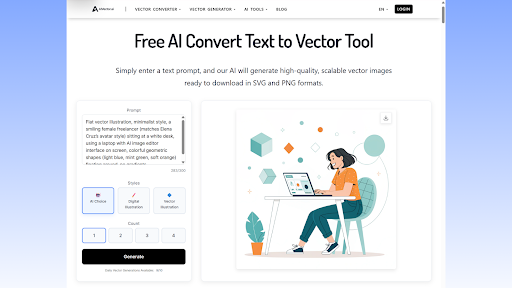
One of the most powerful aspects of AIVector is its ability to understand textual descriptions and map them into structured vector shapes. For creators who think visually but communicate through words, this becomes a shortcut to producing usable graphics. When describing shapes, colors, or layout relationships, the system generates vectors that follow the semantic rules of the prompt. This is where tools like the text-to-vector engine play a central part, bridging ideation with execution. The process allows early-stage concepts to become concrete visuals that clients and teammates can immediately evaluate.
Using Precise Language to Refine Outputs
While natural language is flexible, choosing specific terms significantly improves the results. Writers and editors familiar with structured rewriting tools such as Sentence Rewriter understand how wording affects interpretation. The same applies here: detailed descriptions produce more accurate shapes, proportions, and color values. Over time, creators develop a vocabulary that guides AIVector toward outputs that match brand guidelines or stylistic preferences. The iterative nature of text-based refinement eliminates the need for constant manual adjustments in vector software.
When HTML Elements Become Vector-Ready Assets
Developers often maintain interface components, icons, and micro-illustrations in code-based environments. Converting these HTML structures into design-ready vector graphics has traditionally required plugins or manual exports. AIVector solves this by interpreting the DOM structure and transforming it into clean vector paths. This is particularly useful in teams where designers depend on developers to provide asset snapshots. With automatic HTML-to-vector conversion, both sides operate with consistent, scalable visuals available at any stage of a project.
(AIVector tool interface)
Elevating Professional Branding Through Consistent Vector Quality
Ensuring Brand Stability Across Multiple Platforms
Brand consistency relies heavily on scalable graphics that behave predictably on different devices. AIVector delivers uniform quality across all exports, ensuring every logo, badge, or illustration maintains crisp edges and accurate proportions. This is especially relevant for companies producing materials across social media, printed merchandise, and mobile experiences. Designers no longer need to manually recreate multiple resolutions; the vector output remains dependable under all conditions.
Streamlining Collaboration Between Designers and Marketers
Cross-functional teams frequently exchange drafts, mockups, and promotional assets under tight deadlines. Vectors generated through AIVector improve communication by removing technical noise such as blurry icons or inconsistent resolutions. Marketers can request rapid changes using plain language, while designers fine-tune the results directly in their preferred editing tools. This removes friction in approval cycles and accelerates campaign launches.
Reducing Rework in Client-Facing Deliverables
Client revisions are a constant part of the design industry. When graphics are not vector-based, resizing or recoloring can introduce quality issues that force creators to redo work from scratch. AIVector minimizes these risks by producing flexible SVG structures that respond cleanly to adjustments. Small edits, such as changing a stroke width or modifying a color palette, take seconds instead of hours. This stability improves delivery timelines and increases the reliability of final outputs.
Looking Ahead: Why AI Vector Workflows Will Become Standard
The Expanding Demand for SVG in Modern Interfaces
Web applications, mobile dashboards, and interactive platforms increasingly depend on SVG assets for performance and scalability. As this demand grows, AIVector positions itself as the bridge between concept and implementation. Its outputs integrate naturally with modern frameworks, supporting responsive display behaviors without sacrificing file size efficiency. Developers gain precise control over path data, while designers maintain visual integrity across devices.
Why AIVector Fits the Future of Fast, AI-Assisted Creation
The evolution of creative workflows points toward tools that eliminate barriers between thought and execution. AIVector’s ability to interpret text, images, and code structures aligns tightly with this direction. It shortens production cycles, preserves quality, and gives creators more freedom to experiment visually. In environments where speed and clarity are essential, the platform becomes not just a convenience but a structural advantage.
Final Perspective on the Role of AI in Vector Design
The combination of scalability, precision, and natural-language control places AIVector at the center of a significant shift in digital design. Creators can move from ideas to ready-to-use assets without switching tools or relying on manual conversion steps. The outcome is a more efficient, more intuitive workflow that supports both rapid experimentation and high-quality delivery. As demands for flexible graphics increase, AI Vector technology will continue to redefine how teams produce and maintain visual assets.

