


Why need enterprise remote access solutions?
In the contemporary digital era, providing prompt, effective, and secure remote support is becoming more than just a perk. Companies everywhere are struggling to manage remote workers, provide round-the-clock IT support, and maintain robust security protocols while striving for operational effectiveness and scalability. That’s why we need enterprise remote access solutions.
AnyViewer is at the forefront of technology for remote access and support. AnyViewer’s broad feature set, which is customized to satisfy the complex needs of corporations, has earned it a reputation as best remote access software for small businesses and big enterprises seeking dependability, performance, and security.
9 reasons that set AnyViewer apart
AnyViewer distinguishes out in the competitive sector of remote access solutions for enterprises for many reasons.
Superior security and adherence
The primary attractiveness of AnyViewer is its consistent commitment to security. AnyViewer’s features, such as GDPR compliance, two-factor authentication, and asymmetric ECC 256-bit end-to-end encryption, ensure that every remote connection is safe from threats. Furthermore, AnyViewer’s compliance with demanding industry standards demonstrates its capacity to meet the stringent security requirements of businesses across numerous industries.
Innovative performance
AnyViewer also shines in terms of performance. AnyViewer provides high frame rate streaming of up to 60 frames per second, allowing for a remote access experience as close to being present in person as feasible. This high-performance technology allows tasks that need high graphical fidelity, such as video editing or CAD work, to be accomplished remotely without sacrificing quality.
Scalability and flexibility
AnyViewer’s license model is scalable and adjustable, meeting the specific needs of all types of enterprises. AnyViewer provides businesses with the flexibility they need to respond to changing market conditions and expand, whether it’s scaling up to meet growth or adjusting to shifting workforce demands. Its extensive device compatibility exhibits versatility, allowing for seamless connections regardless of hardware or operating system.
Enhanced support and access management functionalities
AnyViewer provides sophisticated access management solutions that enable IT administrators to have fine-grained control over access and permissions, going beyond simple remote access. AnyViewer offers a comprehensive suite of support capabilities, such as personalized shortcuts and chat functionality, that enables a complex platform to handle various remote assistance scenarios and provide instant remote IT support services.
Monitoring and managing endpoints
AnyViewer enables extensive endpoint control and monitoring. IT professionals may enhance IT operations and solve possible problems ahead of time by remotely monitoring a large number of devices via screens. Enterprises can also categorize devices and provide role permissions to improve administration efficiency.
Excellent user experience
AnyViewer’s design prioritizes simplicity and utility. The system’s clear design reduces learning curves while increasing productivity for both end users and support professionals.
Compatible with multiple devices
In today’s complicated technological environment, cross-platform compatibility is critical. AnyViewer shines in this area because it is compatible with a wide range of operating systems, including Windows, iOS, and Android. This ensures that groups may maintain a connection to any PC, tablet, smartphone, or server.
Recognition in the industry and satisfaction from customers
AnyViewer’s dominance is evident from the accolades it has received from professionals in the field and a worldwide customer base. Testimonials from top companies demonstrate the solution’s effectiveness and validate its position as the best option for remote help for enterprises.
AnyViewer is notable for its deft blend of performance, security, adaptability, and user-centered design. With this combination, AnyViewer stands out and maintains its position as the best remote assistance provider for companies trying to live up to the demands of the contemporary digital workplace
Get started with AnyViewer with ease
Let’s see how to use AnyViewer with ease. Follow the steps below:
Step 1. On both computers, download and install AnyViewer. To start using the application, launch it.
Step 2. Open the app and locate the login section. Please create an account if you are a new user of the site. To log in, current users only need to enter their login credentials.
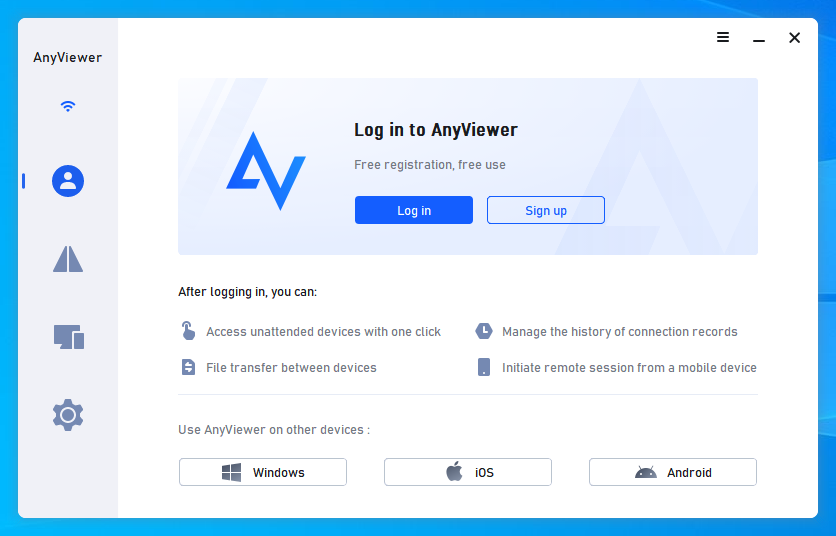
Step 3. Upgrade your account to the Professional or Enterprise plan when logged in successfully. The upgraded features will be automatically incorporated into AnyViewer’s user interface.
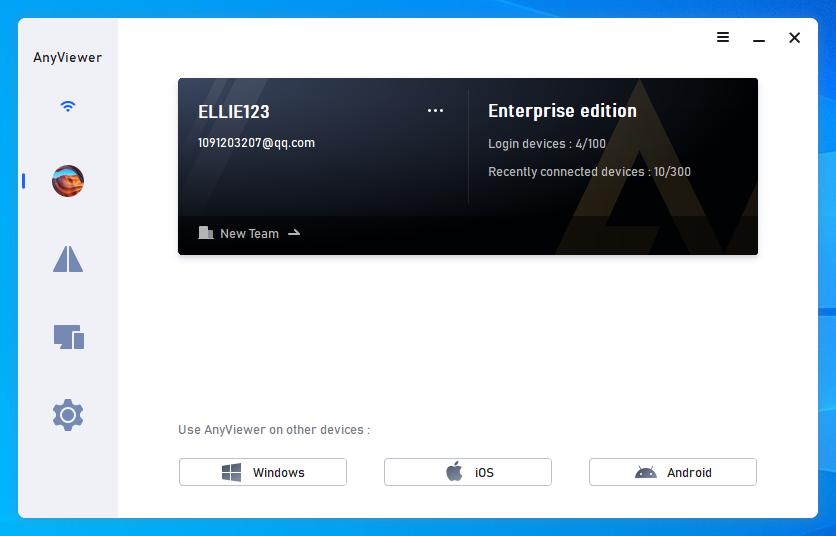
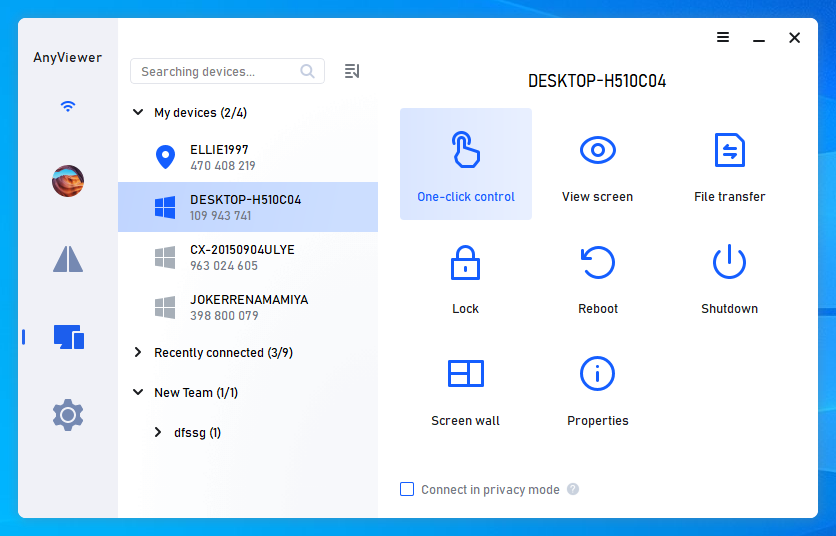
Step 4. Log in to your AnyViewer account on multiple devices. Use the One-click control function to establish instant, direct connections between devices.
The bottom line
Without a doubt, AnyViewer is among the greatest enterprise remote access solutions. Because it provides strong performance, dependable security, and an intuitive interface, it is perfect for modern organizations. With a global user base and a well-established reputation in the business, AnyViewer facilitates effective operations and communication amongst teams that are spread out geographically.
Email your news TIPS to Editor@Kahawatungu.com — this is our only official communication channel
