

How to Download Songs From Spotify to MP3

How to Download Songs From Spotify to MP3
Many people enjoy Spotify, but many of you may often deal with ads and unwanted song recommendations, disrupting their listening experience. While Spotify Premium removes ads and allows downloads, not everyone wants to pay for it. So, is there a way to download Spotify songs to MP3 files without Premium? The answer is certainly yes!
This article will show you effective methods to convert Spotify tracks into MP3, giving you the freedom to listen offline, transfer music to any device, and enjoy an uninterrupted experience. Keep reading to discover the best tools and techniques to download Spotify songs hassle-free!
Tool Requirement: MuConvert Spotify Music Converter
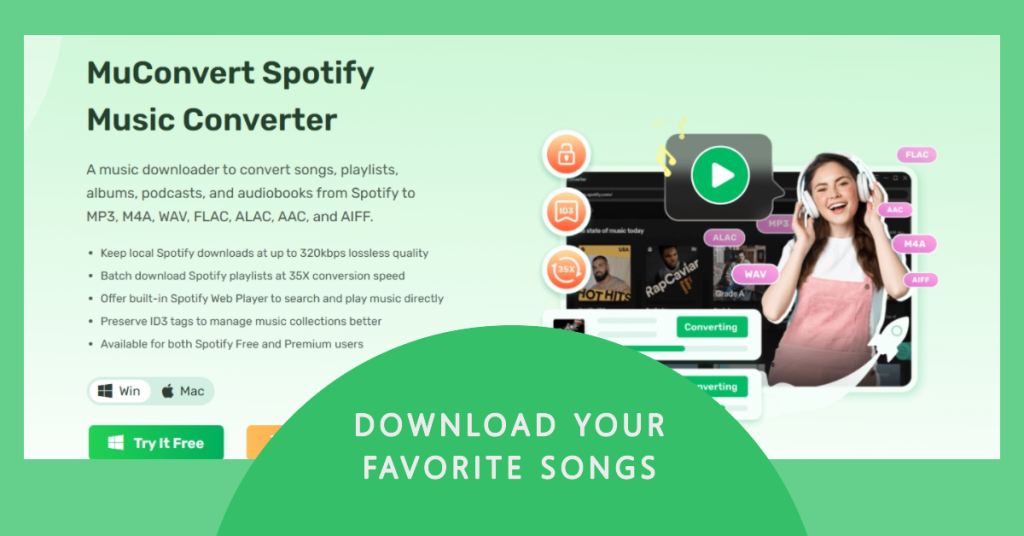
If you hope to download Spotify songs without subscribing to Premium plan, MuConvert Spotify Music Converter is the perfect choice that makes this process easy. It allows you to download and convert Spotify tracks, albums, playlists, and even podcasts into high-quality audio formats like MP3, M4A, WAV, and FLAC. Whether you’re a fan of pop, hip-hop, country, electronic, or R&B, you can effortlessly save songs from artists like Taylor Swift, Bruno Mars, and Billie Eilish as local files without restrictions.
Highlighted Features of MuConvert Spotify Music Converter
- Supports Multiple Formats: Support converting Spotify music to multiple mainstream formats like MP3, M4A, WAV, and FLAC for offline listening. These local music files let you listen to them whenever you want.
- High-Quality Sound Quality: You can still enjoy 320kbps lossless audio with ID3 tags preserved.
- No Limiting Restrictions: As the music is downloaded to local storage, there is no expiration date anymore, and there are no downloading number limits, and no ads disturbing.
- Cross-Platform Compatibility – Works on Windows and Mac, and converted files can be transferred to any mobile device.
How to Download Songs from Spotify to Computer
Using MuConvert Spotify Music Converter, you can easily download and convert Spotify songs to MP3 or other formats. Ler’s check them out right now.
Step 1: Install and Launch MuConvert Spotify Music Converter
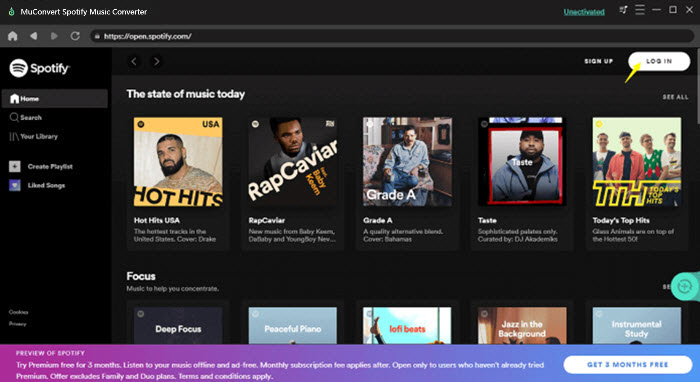
Download and install MuConvert Spotify Music Converter on your Windows or Mac computer. Once installed, launch the program and click the “Login” button at the top right, then enter your Spotify account and password to sign in to the built-in Spotify Web Player.

Step 2: Select Songs, Playlists, or Albums to Convert
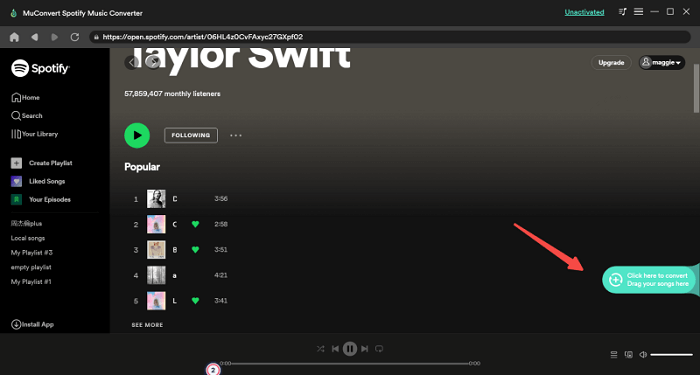
You can either type the title or just choose from your muic collections to find the songs, playlists, or albums you want to download. Drag and drop the music to the green “+” button, and MuConvert will automatically parse songs and add them to the download queue.

Step 3: Choose Output Format and Quality
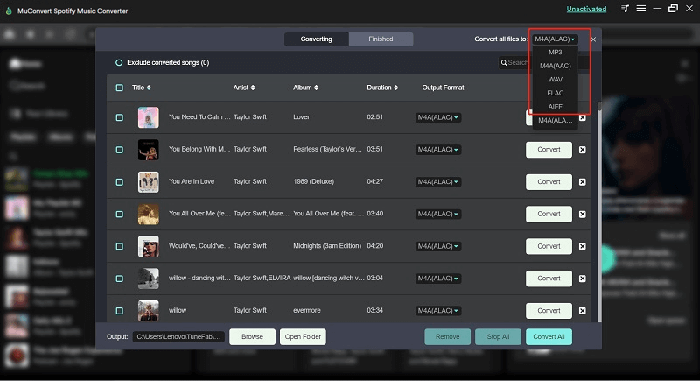
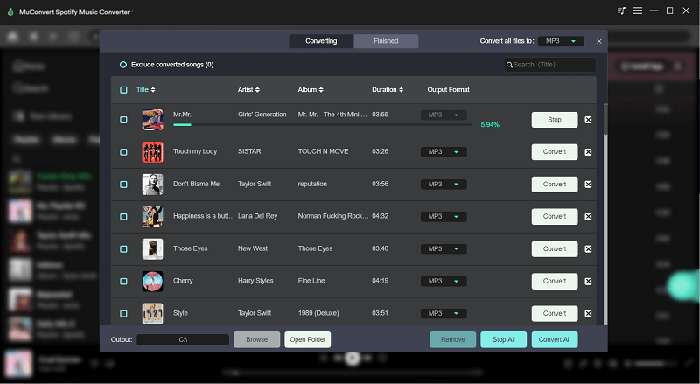
Click the “Convert all files to” button in the top right of the conversion window to choose an output format like MP3, M4A, FLAC, WAV, AIFF, or ALAC for all songs. If you want different formats for each song, use the dropdown menu next to each track.

Step 4: Start Downloading and Enjoy Offline Music
Click the “Convert All” button to start the process. Once completed, your songs will be saved as local files, allowing you to transfer them to any device and enjoy them without restrictions.

Now you can listen to Spotify music offline, ad-free, and without Premium!
Take advantage of the ongoing special promotion and save 25% by entering the discount code “getmu25”.
FAQs about Downloading Spotify Music to MP3
Q1. Can I Download Spotify Songs Directly on My Phone?
Yes, if you have Spotify Premium, you can download songs, albums, playlists, and podcasts to listen offline on your phone. Here’s how to do it:
- Open Spotify and log into your Premium account.
- Find the playlist, album, or podcast you want to download.
- Tap the Download button (a downward arrow) to start downloading.
- Once completed, a green checkmark will appear next to the downloaded content.
Note that there are also limitations you need to notice. First, you must access the Internet at least once every 30 days, or downloads will be removed. What’s more, downloaded songs only work within the Spotify app and cannot be transferred to other devices,since the music files are encrypted.
Q2. Where Are Spotify Music Downloads Stored?
For Spotify Premium Users
If you download music using a Spotify Premium account, the files are saved in an encrypted format within Spotify’s database. On a Windows PC, these files are typically stored in:
ð C:\Users\YourUsername\AppData\Local\Spotify\Storage
However, these files cannot be played directly outside of the Spotify app, as they are encrypted and tied to your account.
For MuConvert Users
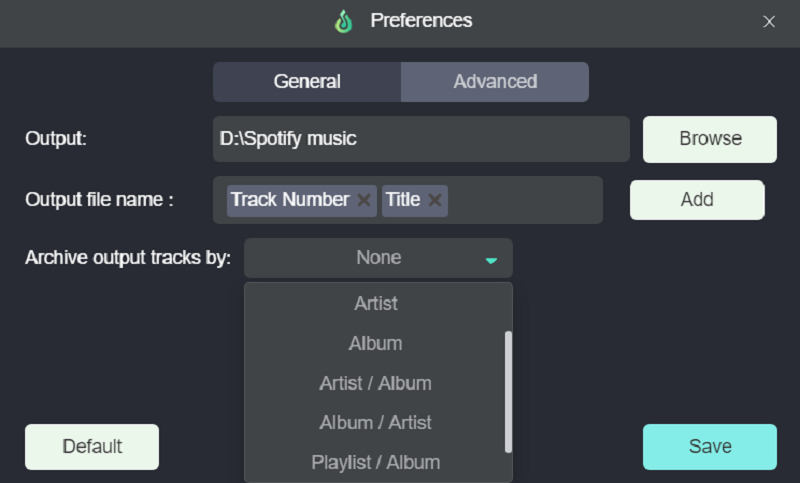
If you use a tool like MuConvert Spotify Music Converter, downloaded songs are saved in a standard audio format such as MP3 or FLAC. You can set your preferred storage location in the Preference settings within the software, which means you can easily locate them. Unlike Spotify Premium downloads, these files can be accessed directly and played on any media player.

Conclusion
All in all, for those of you who meet certain trouble when playing Spotify and want to access to the large library of Spotify songs, a tool like MuConvert Spotify Music Converter is the perfect solution. With MuConvert, you can download Spotify tracks in MP3, FLAC, and other common formats, store them anywhere you like, and play them on any device without restrictions. Try MuConvert Spotify Music Converter today and enjoy your favorite Spotify songs with complete freedom!
Take advantage of the ongoing special promotion and save 25% by entering the discount code “getmu25”.

