

How To Connect LNB Cable To Decoder

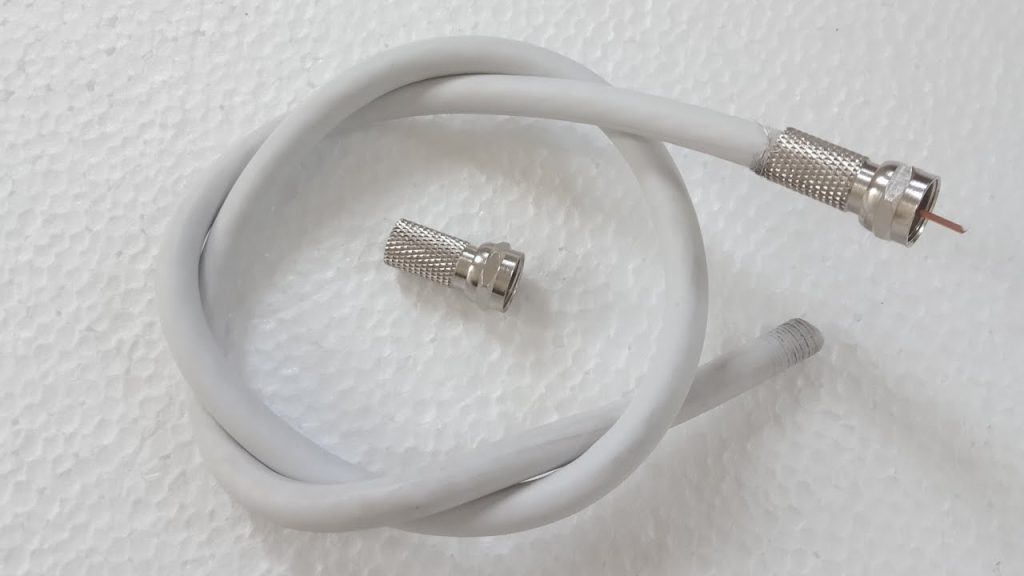
Connecting the LNB (Low Noise Block) cable to your decoder is an essential part of setting up a satellite TV system. The LNB receives signals from the satellite dish and sends them to the decoder, which processes the data and displays the television channels. Understanding how to connect the LNB cable correctly ensures a strong signal and smooth viewing experience.
- Understanding What an LNB Cable Does
The LNB is a small device attached to the arm of your satellite dish. Its job is to collect satellite signals and convert them into a lower frequency that your decoder can read. The cable connected to the LNB—usually a coaxial cable—carries this signal into your house and plugs into your decoder.
If the LNB cable is damaged or improperly connected, you may experience “no signal” errors, pixelated images, or missing channels. Proper installation guarantees stable signal transmission.
- Tools and Materials You Will Need
Before starting the connection, prepare the following items:
- Coaxial (LNB) cable
- F-type connectors
- Wire stripper or utility knife
- Spanner or small wrench
- Insulation tape
- Your satellite dish and decoder
Having the correct tools makes the installation faster and more secure.
- Safety and Preparation
Ensure that your satellite dish is properly mounted and pointed toward the correct satellite direction. Before handling the cables, make sure your decoder is unplugged from the power supply to avoid electrical damage. Check that the LNB and coaxial cable are in good condition without cuts, bends, or corrosion.
- Preparing the LNB Cable
- Strip the coaxial cable.
Use a wire stripper to remove about 1.5 cm of the outer insulation from the end of the cable. Expose the braided copper shield underneath and fold it backward neatly. - Expose the inner conductor.
Carefully strip about 1 cm of the inner white insulation to reveal the central copper wire. Avoid cutting or bending this wire, as it’s responsible for carrying the signal. - Attach the F-type connector.
Screw the connector tightly onto the stripped end of the cable until the inner copper wire sticks out slightly from the top of the connector. Ensure it’s secure and straight.
- Connecting the Cable to the LNB
Locate the LNB on your satellite dish. It has one or more ports depending on whether you have a single, twin, or quad LNB.
- Screw the F-connector onto the LNB port.
Gently attach the prepared end of the coaxial cable to the port by turning the connector clockwise. Tighten it using your fingers or a small wrench—do not overtighten, as it can damage the connector or the LNB. - Weatherproof the connection.
Wrap the connection area with insulation tape to protect it from rain and dust. This step prevents signal interference and corrosion.
- Connecting the Cable to the Decoder
- Locate the LNB IN port on the decoder.
This is usually labeled “LNB IN” or “Satellite IN” on the back of your decoder. - Attach the other end of the coaxial cable.
Screw the second F-type connector (on the other end of your cable) onto the LNB IN port. Make sure it is tight and stable. - Check your connections.
Ensure both ends are secure, with no loose fittings. Avoid sharp bends in the cable, as this can weaken the signal.
- Powering and Testing the Connection
- Plug in and power on your decoder.
Connect the decoder to your TV and switch on the power. - Access the signal strength menu.
Go to your decoder’s installation or signal test menu. You should see bars for signal strength and quality. - Fine-tune the dish if necessary.
If the signal is weak, slightly adjust your satellite dish alignment until the signal bars improve. Once optimal signal quality is achieved, tighten the dish bolts securely.
- Troubleshooting Common Problems
- No signal: Check that both cable ends are properly connected and that the LNB is facing the right direction.
- Weak signal: Replace damaged cables or connectors and make sure there are no sharp bends.
- Intermittent signal: Ensure that all connections are tight and protected from moisture.
Also Read: How To Clean Pewter

