

How To Flush A Huawei Phone

How To Flush A Huawei Phone
Flushing a Huawei phone means performing a full software reset or reinstalling the system software to remove errors, viruses, or slow performance. This process wipes all data and restores the phone to its original state. Whether your phone is lagging or stuck, here is how to flush a Huawei phone.
- Back Up Your Data
Before flushing your Huawei phone, ensure all important data is backed up. This includes contacts, photos, messages, and apps. You can use Huawei Cloud, Google account, or a computer to save your files. Flushing will erase everything on the device.
- Charge Your Phone
Make sure your phone has at least 50% battery charge. A full flush or reset process can take several minutes, and interruption due to low battery can cause system errors or damage.
- Use Factory Reset (via Settings)
If the phone is working normally and you can access the screen:
- Open Settings
- Tap on System & updates
- Select Reset
- Choose Factory data reset
- Confirm by tapping Reset phone
The phone will restart and begin the flushing process. Once complete, it will reboot to the original factory setup screen.
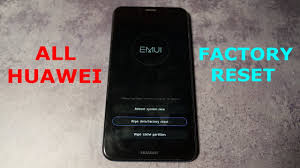
- Use Recovery Mode (if the phone is stuck or not booting)
If your Huawei phone is frozen or not turning on properly, use recovery mode:
- Turn off the phone completely
- Press and hold the Volume Up and Power buttons at the same time
- Release the buttons when the Huawei logo appears
- In recovery mode, use the volume keys to navigate to Wipe data/factory reset
- Press the Power button to select it
- Confirm the reset when prompted
This will flush the phone and erase all content. After the reset, choose Reboot system now.
- Optional: Use HiSuite on a PC
For advanced users, you can also use HiSuite (Huawei’s official PC software):
- Download and install HiSuite on your computer
- Connect your phone via USB
- Choose System recovery or Reset device
Also Read: How To Eat Persimmon Fruit

