


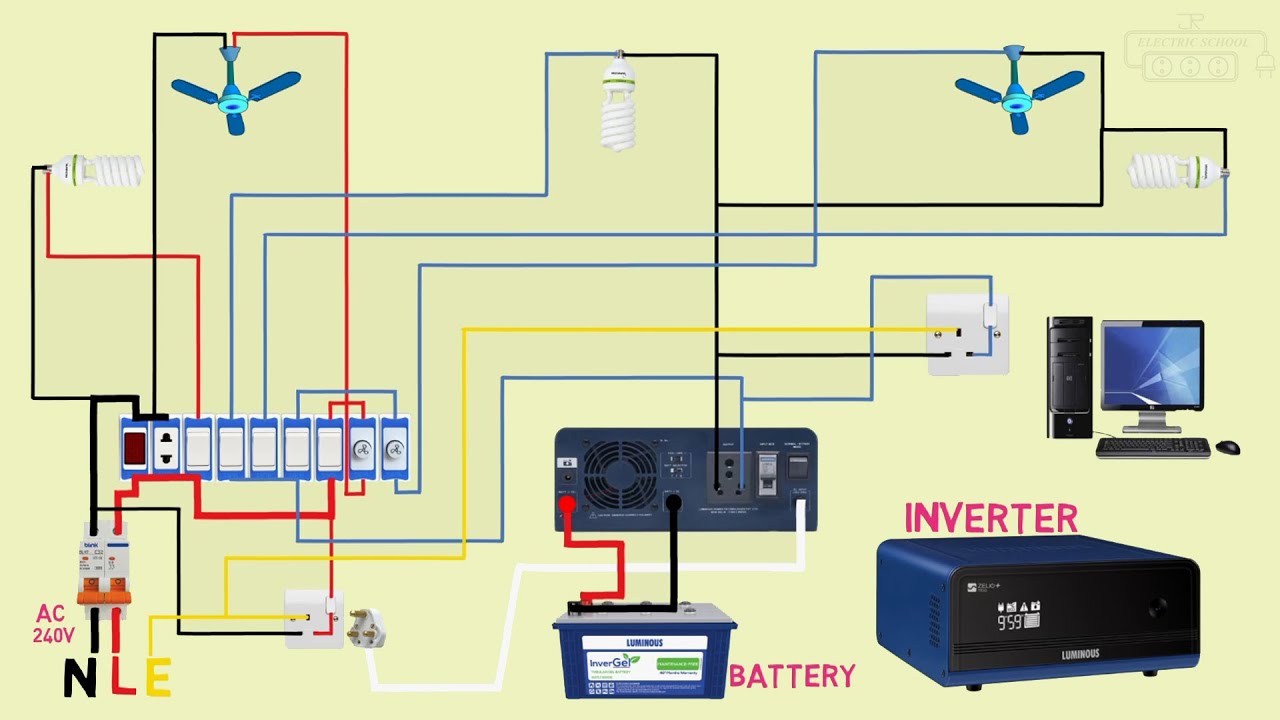
Connecting an inverter to your home’s main electrical line allows you to have a continuous power supply during electricity outages. The inverter converts stored energy from batteries into AC power that can run your home appliances. While the process requires caution, it’s possible to connect an inverter safely if you understand the wiring and follow the correct steps.
How an Inverter Works
An inverter functions as a power backup system. It draws power from the main grid to charge its battery when electricity is available. When there’s a power cut, it automatically switches to battery mode and supplies AC power to connected appliances. Connecting the inverter directly to your home’s main line ensures that selected lights, sockets, and essential appliances continue working without interruption.
However, since you’ll be dealing with electricity, it’s crucial to follow safety rules or seek help from a qualified electrician if you’re unsure about the process.
Equipment You Will Need
Before you start, make sure you have the following:
- An inverter (preferably a pure sine wave inverter)
- Deep-cycle batteries
- Power cables with proper thickness
- Circuit breaker or changeover switch
- Electrical tape and connectors
- Multimeter for testing voltage
Having the correct materials ensures that the system operates efficiently and safely.
Choosing the Right Connection Method
There are two common ways to connect an inverter to your main line: using a manual changeover switch or an automatic changeover switch (ATS).
Manual changeover switch: You turn a switch manually to shift from grid power to inverter power during outages.
Automatic transfer switch (ATS): This automatically switches to inverter power when electricity goes off and back to grid power when it returns.
Both methods work well, but ATS systems are more convenient and safer for sensitive electronics.
Preparing for the Installation
Turn off the main power supply before making any connections. Identify the essential circuits in your distribution board that you want powered by the inverter, such as lighting, Wi-Fi, and TV outlets. Heavy appliances like stoves and heaters should not be connected unless your inverter can handle high loads.
Next, position the inverter and battery setup in a well-ventilated area away from direct sunlight or moisture.
Wiring the Inverter to the Main Line
- Connect the battery to the inverter.
Attach the positive cable from the inverter to the positive terminal of the battery and the negative cable to the negative terminal. Tighten the connections and ensure polarity is correct. - Install a changeover switch.
Mount the switch between the main power line and the inverter output. This device helps direct power from either the utility grid or the inverter to your selected circuits. - Connect the inverter output.
Run a cable from the inverter’s AC output to the “inverter input” side of the changeover switch. This allows power from the inverter to reach your household circuits when grid power fails. - Link the grid line.
Connect the utility power supply to the “main input” of the changeover switch. This ensures your circuits receive electricity from the grid when power is available. - Connect to the home distribution board.
From the “output” side of the changeover switch, run cables to the sub-circuits in your home that you want powered. Label the circuits for clarity. - Test the system.
Turn on the main power and observe if the inverter starts charging. Then switch to inverter mode using the changeover switch and check if your selected circuits receive power.
Safety Precautions
- Always disconnect the main power before handling electrical connections.
- Use properly rated cables to prevent overheating.
- Install circuit breakers to protect against overloads.
- Avoid overloading the inverter with high-power appliances.
- If unsure, get help from a qualified electrician to ensure compliance with wiring standards.
Also Read: How To Clean A Throttle Body Without Removing It
Email your news TIPS to Editor@Kahawatungu.com — this is our only official communication channel
