
Close Menu
    Facebook X (Twitter) Instagram
    Facebook X (Twitter) Instagram
    KahawatunguKahawatungu
    Button
    • NEWS
    • BUSINESS
    • KNOW YOUR CELEBRITY
    • POLITICS
    • TECHNOLOGY
    • SPORTS
    • HOW-TO
    • WORLD NEWS
    KahawatunguKahawatungu
    HOW-TO

    How To Factory Reset Lenovo Laptop

    Damaris GatwiriBy Damaris GatwiriJune 4, 2025No Comments2 Mins Read
    Facebook Twitter WhatsApp Telegram Email
    How To Factory Reset Lenovo Laptop
    How To Factory Reset Lenovo Laptop
    Share
    Facebook Twitter WhatsApp Telegram Pinterest Email Copy Link

    Factory resetting a Lenovo laptop means erasing all your files and settings to return it to its original condition. This is helpful when your laptop has performance issues, viruses, or if you’re planning to sell or give it away. Here is how to factory reset Lenovo laptop.

    Before You Start

    Make sure to back up any important files, as the process will delete all your data.

    Using Windows Settings (Windows 10 or 11)

    1. Click on the Start button and select Settings (gear icon).
    2. Go to System, then choose Recovery from the side menu.
    3. Under Recovery options, click Reset this PC, then click Get started.
    4. Choose Remove everything to do a full factory reset.
    5. Select either:
      • Cloud download (downloads Windows from Microsoft),
      • or Local reinstall (uses files already on your laptop).
    6. Follow the prompts and click Reset to begin. The laptop will restart and reset itself.

    Using Lenovo OneKey Recovery (for some older models)

    1. Turn off your laptop.
    2. Look for a small Novo button (a pinhole) next to the power button. Use a paperclip to press it.
    3. From the menu that appears, choose System Recovery.
    4. Select Restore from initial backup and click Next.
    5. Follow the instructions to complete the reset.

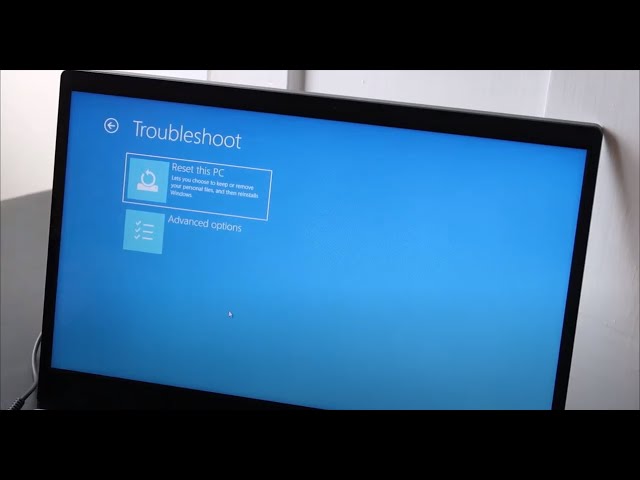
    Using Advanced Startup (if Windows won’t load)

    1. Hold the Shift key and click Restart from the login screen or start menu.
    2. Select Troubleshoot > Reset this PC.
    3. Choose Remove everything.
    4. Follow the instructions to reset your laptop.

    Also Read: How To Draw Hulk

    Email your news TIPS to Editor@Kahawatungu.com — this is our only official communication channel

    Follow on Facebook Follow on X (Twitter)
    Share. Facebook Twitter WhatsApp LinkedIn Telegram Email
    Damaris Gatwiri

    Damaris Gatwiri is a digital journalist, driven by a profound passion for technology, health, and fashion.

    Related Posts

    How To Draw Goku Super Saiyan 50

    December 18, 2025

    How To Draw Goku Super Saiyan 3

    December 18, 2025

    How To Draw Gohan

    December 18, 2025

    Comments are closed.

    Latest Posts

    Trump administration sanctions two more International Criminal Court judges for investigating Israel

    December 19, 2025

    Reprieve as court lifts order baring Marie Stopes from offering abortion services

    December 19, 2025

    Trump expands access to cannabis in a major shift in drug policy

    December 19, 2025

    Kung’u Muigai stopped from publishing bribery claims against Justice Lenaola

    December 19, 2025

    Nigeria apologises over Burkina Faso military flight that saw 11 servicemen detained

    December 19, 2025

    Rebels start to withdraw from key DR Congo city, leaders say

    December 19, 2025

    Australian PM announces crackdown on hate speech after Bondi shooting

    December 19, 2025

    Peter Arnett, Pulitzer-winning war reporter, dies aged 91

    December 19, 2025
    Facebook X (Twitter) Instagram Pinterest
    © 2025 Kahawatungu.com. Designed by Okii.

    Type above and press Enter to search. Press Esc to cancel.