
Close Menu
    Facebook X (Twitter) Instagram
    Facebook X (Twitter) Instagram
    KahawatunguKahawatungu
    Button
    • NEWS
    • BUSINESS
    • KNOW YOUR CELEBRITY
    • POLITICS
    • TECHNOLOGY
    • SPORTS
    • HOW-TO
    • WORLD NEWS
    KahawatunguKahawatungu
    HOW-TO

    How To Install A Toilet Seat

    Damaris GatwiriBy Damaris GatwiriJune 15, 2025No Comments2 Mins Read
    Facebook Twitter WhatsApp Telegram Email
    How To Install A Toilet Seat
    How To Install A Toilet Seat
    Share
    Facebook Twitter WhatsApp Telegram Pinterest Email Copy Link

    Installing a toilet seat is a simple home improvement task that requires minimal tools and time. Whether you’re replacing a broken seat or upgrading to a new style, you can easily do it yourself. All you need is a screwdriver and possibly an adjustable wrench. Most toilet seats fit standard toilets, so finding the right replacement is usually straightforward. Here is how to install a toilet seat.

    1. Remove the Old Toilet Seat
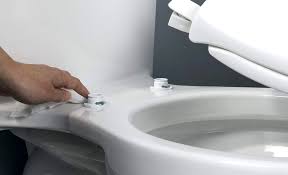
      Start by lifting the seat and locating the two bolts at the back, near the tank. These bolts usually have plastic covers that snap open.
    • Use a flathead screwdriver to hold the top of the bolt
    • From underneath, loosen the nut with your hand or a wrench
      Once both bolts are free, lift the old seat off the toilet bowl.
    1. Clean the Area Around the Holes
      Before installing the new seat, clean the area thoroughly. Remove any dirt, rust, or residue left behind from the old seat. This helps the new seat sit properly and prevents any wobbling.
    2. Position the New Seat
      Take the new toilet seat and align the holes with those on the toilet bowl. Make sure the seat is facing the right way and sits evenly on the rim.
    3. Insert the Bolts
      Insert the new bolts through the holes in the seat and the bowl. Most modern toilet seats come with plastic bolts and nuts that are easy to install by hand. Push the bolts through and begin tightening the nuts underneath.
    4. Tighten the Nuts
      Hold the bolt in place from the top with a screwdriver while you twist the nuts from below. Tighten them enough so the seat doesn’t move, but avoid over-tightening, especially if the bolts are plastic, as they can crack.
    5. Test the Seat for Stability
      Once both bolts are tight, lower the seat and lid to check for alignment. Sit on the seat gently to test its stability. If it shifts, tighten the bolts a bit more.
    6. Snap On the Covers
      If your new seat has plastic caps, snap them over the bolt heads for a clean, finished look.

    Also Read: How To Handle Objections In Sales

    Email your news TIPS to Editor@Kahawatungu.com — this is our only official communication channel

    Follow on Facebook Follow on X (Twitter)
    Share. Facebook Twitter WhatsApp LinkedIn Telegram Email
    Damaris Gatwiri

    Damaris Gatwiri is a digital journalist, driven by a profound passion for technology, health, and fashion.

    Related Posts

    How to Recover Files Permanently Deleted from Recycle Bin

    August 28, 2026

    How to Hotspot on an HP Laptop

    August 28, 2026

    How to Change Windows on an HP Laptop

    August 27, 2026

    Comments are closed.

    Latest Posts

    MCAs turn heat on Arati over stalled projects, poor roads

    August 29, 2026

    US government unveils Sh930 million ground to modernise Kenya police

    August 28, 2026

    Kalonzo Gives NPS, TSC and KDF Seven-Day Ultimatum Over Recruitment

    August 28, 2026

    Wetang’ula warns politicians against undermining IEBC ahead of 2027 polls

    August 28, 2026

    World’s youngest reigning traditional monarch dies aged 34

    August 28, 2026

    Three terror convicts get additional 15-year jail term for escaping from Kamiti prison

    August 28, 2026

    Kennedy Center will briefly delay plan to add Trump’s name to building

    August 28, 2026

    Court stops burial of late KCB boss Rosemary Koech 

    August 28, 2026
    Facebook X (Twitter) Instagram Pinterest
    © 2026 Kahawatungu.com. Designed by Okii.

    Type above and press Enter to search. Press Esc to cancel.