
Close Menu
    Facebook X (Twitter) Instagram
    Facebook X (Twitter) Instagram
    KahawatunguKahawatungu
    Button
    • NEWS
    • BUSINESS
    • KNOW YOUR CELEBRITY
    • POLITICS
    • TECHNOLOGY
    • SPORTS
    • HOW-TO
    • WORLD NEWS
    KahawatunguKahawatungu
    HOW-TO

    How To Make A Mind Map In Word

    Damaris GatwiriBy Damaris GatwiriFebruary 18, 2025No Comments2 Mins Read
    Facebook Twitter WhatsApp Telegram Email
    How To Make A Mind Map In Word
    Share
    Facebook Twitter WhatsApp Telegram Pinterest Email Copy Link

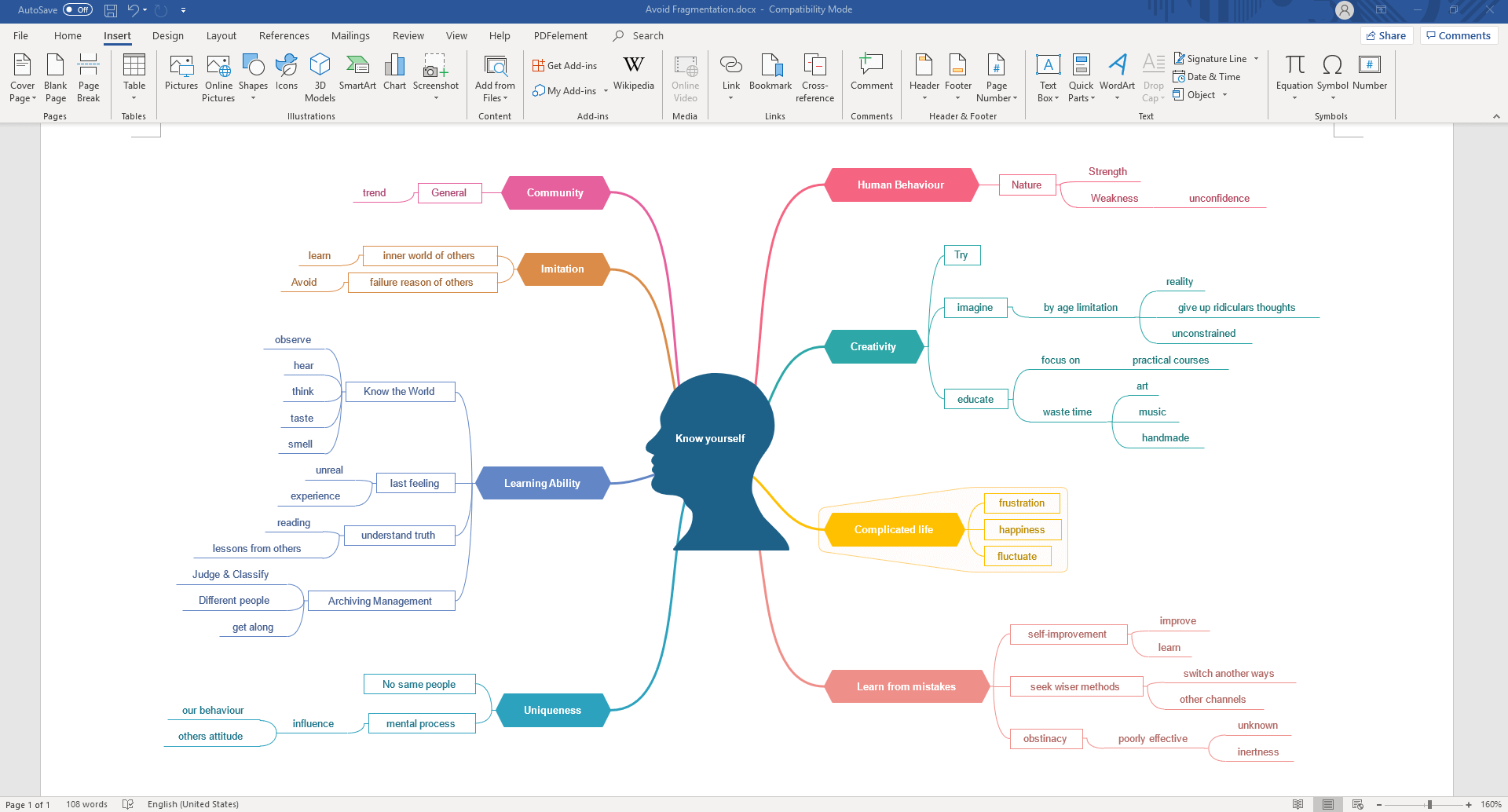
    A mind map is a great tool for brainstorming, organizing ideas, and visualizing information. Microsoft Word offers several ways to create a mind map using shapes, SmartArt, or drawing tools. This guide will walk you through the process of how to make mind map in Word step by step.

    Step 1: Open a Blank Document

    Start by opening Microsoft Word and creating a new blank document. This will give you a clear workspace to build your mind map.

    Step 2: Enable Drawing Tools

    To manually create a mind map, go to the Insert tab and click on Shapes. You can use circles, rectangles, and lines to create a custom layout.

    Step 3: Add the Central Idea

    In a mind map, the central idea is the main topic. Select the Oval shape from the Shapes menu and draw it in the middle of the page. Click inside the shape and type your main idea.

    Step 4: Add Branches

    Mind maps expand by connecting related ideas. Use Lines or Arrows from the Shapes menu to connect the central idea to subtopics. You can also use Text Boxes for adding descriptions.

    Step 5: Insert Subtopics

    For a quicker method, use SmartArt:

    • Click on the Insert tab and choose SmartArt
    • Select a diagram like Hierarchy or Radial to represent a mind map
    • Type your main idea in the center and add subtopics by clicking the text boxes

    Step 6: Customize the Design

    To make your mind map visually appealing, change colors, fonts, and line styles:

    • Click on a shape and go to Format > Shape Fill to change colors
    • Use Bold, Italic, or different fonts to emphasize key points
    • Adjust line thickness or use Dotted Lines for variations in connections

    Step 7: Save and Share

    Once your mind map is complete, save the document. You can also export it as a PDF or an image by taking a screenshot.

    Also Read: How To Make Crumbed Chicken

    Email your news TIPS to Editor@Kahawatungu.com — this is our only official communication channel

    Follow on Facebook Follow on X (Twitter)
    Share. Facebook Twitter WhatsApp LinkedIn Telegram Email
    Damaris Gatwiri

    Damaris Gatwiri is a digital journalist, driven by a profound passion for technology, health, and fashion.

    Related Posts

    How To Draw Toothless

    December 15, 2025

    How To Draw A Tie

    December 15, 2025

    How To Draw A Taxi

    December 15, 2025

    Comments are closed.

    Latest Posts

    Ugandan army admits holding priest who’d been missing for days

    December 15, 2025

    Rob Reiner: Six classic movies from the ‘big-hearted genius’ director

    December 15, 2025

    Airbnb fined £56m by Spain for advertising unlicensed properties

    December 15, 2025

    Smooth end to Messi India tour after Kolkata chaos

    December 15, 2025

    Cross-Border Travel Risks Increase: The Rising Need for International Travel Insurance

    December 15, 2025

    Hollywood director Rob Reiner and wife Michele found dead in LA home

    December 15, 2025

    Police release man detained as a person of interest in Brown University shooting

    December 15, 2025

    Hong Kong media tycoon Jimmy Lai found guilty in landmark national security trial, faces possible life sentence

    December 15, 2025
    Facebook X (Twitter) Instagram Pinterest
    © 2025 Kahawatungu.com. Designed by Okii.

    Type above and press Enter to search. Press Esc to cancel.