


If you prefer listening to audiobooks over reading paperbacks or novels, you’ve surely heard of Audible. Chances are, you also have a subscription. If you’re going on a hike where the network is weak and just have your Apple Watch, you might want to take your audiobooks offline. In this article, we will take a look at how to create and play MP3 audiobooks from Audible on Apple Watch without the app.
Way 1: Play Audible on Apple Watch [with Audible Plan]
The first way to play Audible audiobooks and podcasts on your Apple Watch is through the official app. In this section, we will take an in-depth look at how to play Audible on Apple Watch. We’ll start with a quick guide on how to install the Audible App on your Apple Watch.
How to Install Audible App on Apple Watch
First, however, there are some prerequisites. You must have an iPhone and an Apple Watch updated to the latest versions. Since the Audible app is only compatible with Apple Watch Series 7, SE, and Series 3, you’ll need to have one of those models.
You’ll also need an Audible account, for which you’ll have to sign up through the app or the website. Lastly, please ensure that your iPhone is running iOS 12 or higher and your watch is running WatchOS 9 or higher for the steps in this guide to be effective.
Once you’ve ensured that you have all the prerequisites, follow the steps below to install the Audible App on your watch:
Step 1: Download the Apple Watch app on your iPhone and set it up to pair with your watch. Next, download the Audible app on your iPhone and log in using your credentials.
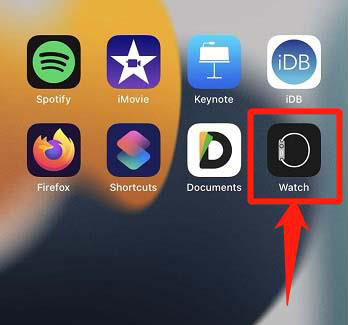
Step 2: Now, open the Apple Watch app and head down to “My Watch”. Then, scroll down to find “Available Apps”.
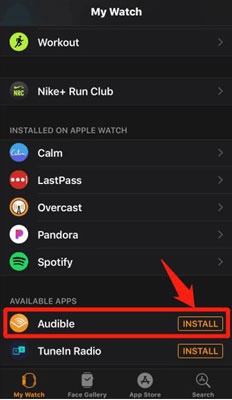
Step 3: From the list of apps displayed, find Audible and tap “Install”. Once the process is complete, you’ll see Audible on the app grid of your watch.
How to Sync Audible Library to Apple Watch
After following the steps above, you now have the app installed on your watch. But, you still need to sync your Audible library to the watch to start listening. To do that, follow the steps below:
Step 1: Open the Audible app on your iPhone and find the audiobook that you want to sync to your watch.
Step 2: Click on the three-dot menu, which should have an option for you to sync the audiobook to your watch.
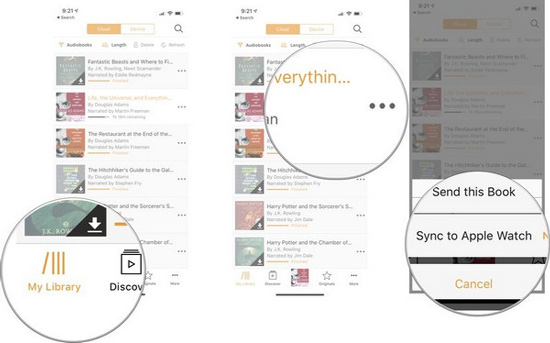
Step 3: Wait for the audiobook to download and to get synced. Once it shows a completion message on your iPhone, cross-check on your watch to ensure that the audiobook is playable.
How to Play Audible Books on Apple Watch
So you’ve followed the steps above to install the Audible app and synced your library. Now, all that’s left is to figure out how to listen to Audible on Apple Watch. To start listening, simply follow the steps below:
Step 1: Open the Audible app on your Apple Watch and scroll through your library to find the book you want to listen to.
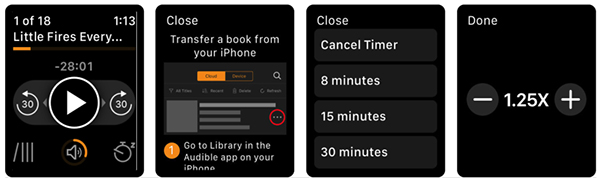
Step 2: Once you’ve found the audiobook you want to listen to, click on play and the audio will be played on your connected wireless headphones or through the watch’s speakers. You can access playback controls on your watch’s interface once the audiobook is playing.
Way 2: Play MP3 Audible on Apple Watch [Without Audible Plan]
When you download an audiobook from Audible, it is .aa or the newer .aax format, which is DRM-protected. In other words, it is a format that can only be played through the official Audible app, iTunes, or Amazon Fire devices. So, you cannot use your iPhone or Apple Watch’s default music played to play these files.
That’s not all. If you’ve ever tried using an Apple Music Converter to convert your audiobooks into a different file format, you know that you need to import them into iTunes first. But, there is a way that allows you to skip this tedious process entirely and lets you convert Audible books in just a few clicks.
If you want to play an audiobook on an MP3 player, iPod, or Walkman, you’ll need to convert the audiobook into a compatible audio format first. And that is where the MuConvert Audible Converter comes through. Using the MuConvert Audible Converter, you can download audible audiobooks into any format such as MP3, M4A, WAV, or FLAC, and transfer them to any device without worrying about DRM issues.
Here are a few ways in which MuConvert outperforms the first method of downloading audiobooks using the official app:
-
You don’t need to subscribe to Audible or log into iTunes to start downloading audiobooks using MuConvert.
-
Get Audible audiobooks in MP3 format and keep them offline forever. You can also listen to them on any device of your choosing besides the Apple Watch.
-
Split up long audiobooks into chapters or halves to make the listening experience more convenient.
-
MuConvert downloads files 60x faster than others on the market while preserving lossless quality and ensuring flawless results.
-
New users get a 15-day trial to download any audiobooks for free to see how powerful the software is.
Here is a quick guide on how to use MuConvert Audible Converter to download Audible on Apple Watch:
Step 1: Download the MuConvert Audible Converter, as well as the audiobook you want to convert to MP3 using the Audible website or app for Windows/Mac.
Step 2: Open the MuConvert Audible Converter app and click in the center to add files, or simply drag and drop them in the conversion window. Remember that the software only works with AA or AAX files that you can download from Audible.
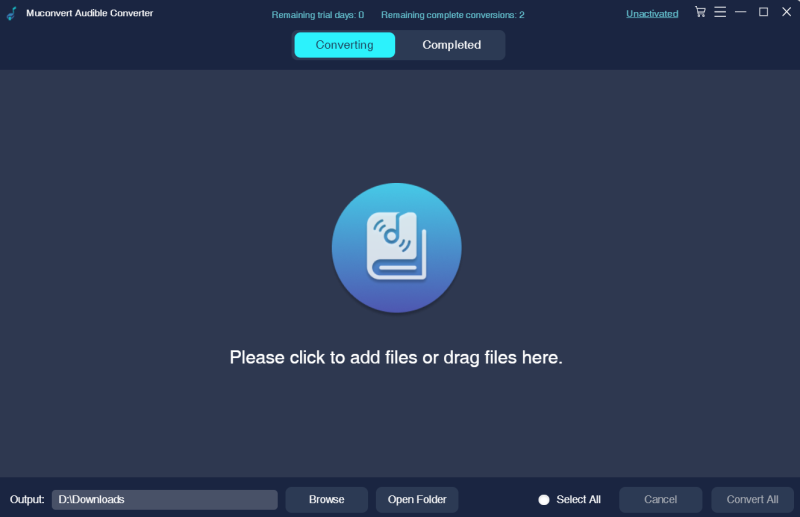
Step 3: Select the file format (MP3, WAV, M4A, or FLAC), sample rate, and bit rate for your converted file.
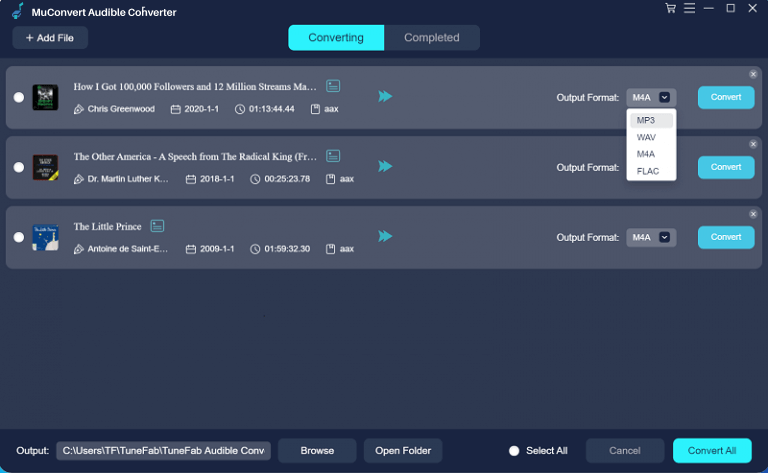
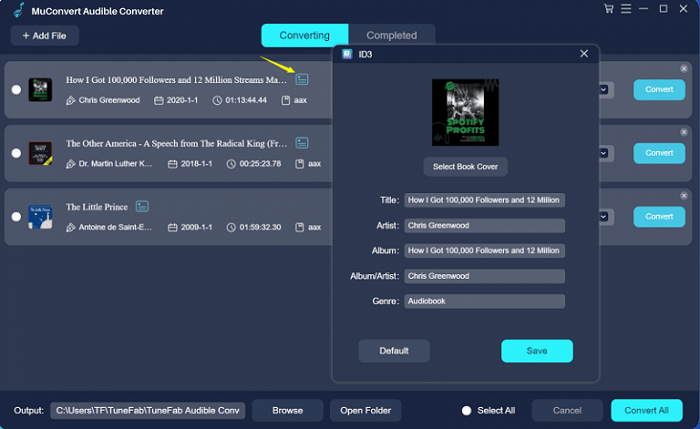
Step 4: Choose whether the file will be split into chapters or parts or if it will be downloaded as a singular file. You may also edit the ID3 information of each audiobook as per your requirements.
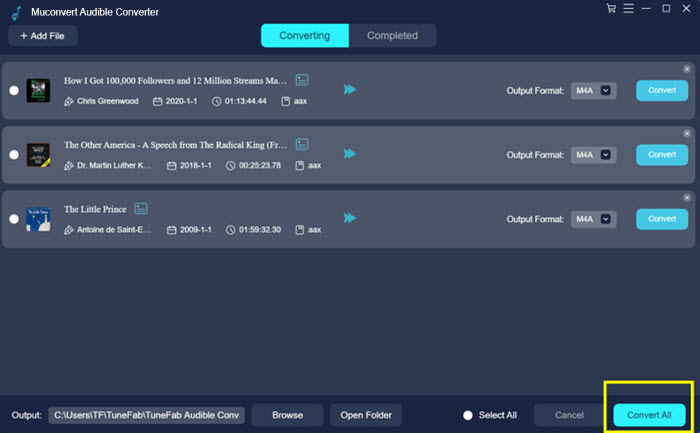
Step 5: Click on “Convert All” and wait for the download to be completed. Once the download process is finished, you can directly access the output by clicking on “Open Folder” at the bottom of the conversion window.
Step 6: Now, you can move converted MP3 audiobooks to Apple Watch using iTunes easily. After syncing, you can listen to Audible on Apple Watch anytime and anywhere.
Conclusion
In this guide, we’ve gone over two step-by-step methods to play Audible on Apple Watch. If you have an active subscription and an iPhone, you can easily follow the first method to sync your library to your watch. But, if the freedom of keeping audiobooks in MP3 format sounds better, you can’t go wrong with MuConvert Audible Converter.
With this top AAX to MP3 converter, you can download MP3 files of your favorite audiobooks without an Audible subscription or logging into iTunes. You also get the option to split up your audiobooks into chapters or parts at your convenience. So, get started with a free 15-day trial of the MuConvert Audible Converter today.
Email your news TIPS to Editor@Kahawatungu.com — this is our only official communication channel
