
Close Menu
    Facebook X (Twitter) Instagram
    Facebook X (Twitter) Instagram
    KahawatunguKahawatungu
    Button
    • NEWS
    • BUSINESS
    • KNOW YOUR CELEBRITY
    • POLITICS
    • TECHNOLOGY
    • SPORTS
    • HOW-TO
    • WORLD NEWS
    KahawatunguKahawatungu
    HOW-TO

    How To Lock A Cell In Excel Formula

    Damaris GatwiriBy Damaris GatwiriJune 20, 2025No Comments2 Mins Read
    Facebook Twitter WhatsApp Telegram Email
    lock-freeze-cell-formula-4
    lock-freeze-cell-formula-4
    Share
    Facebook Twitter WhatsApp Telegram Pinterest Email Copy Link

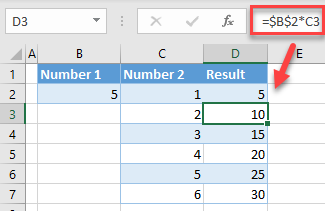
    Locking a cell in an Excel formula means keeping a specific cell reference fixed, even when you copy or drag the formula to other cells. This is done using absolute referencing. It helps maintain consistency when you need one constant value to be used in multiple calculations without changing. Here is how to lock a cell in Excel formula.

    1. Understand Cell References
      In Excel, there are two main types of cell references:
    • Relative reference (e.g., A1): changes when the formula is copied.
    • Absolute reference (e.g., $A$1): remains fixed no matter where the formula is copied.

    Locking a cell involves converting a relative reference into an absolute one.

    1. Use the Dollar Sign ($)
      To lock a cell in your formula, add a dollar sign before the column letter and row number. For example:
    • $A$1 locks both the column and the row
    • A$1 locks only the row
    • $A1 locks only the column

    This tells Excel to always refer to that exact cell, no matter where the formula is moved.

    1. Apply in a Formula
      Suppose you want to multiply values in column A by a constant in cell B1. You would write:
      =A2*$B$1

    When you copy this formula down the column, A2 will change to A3, A4, etc., but B1 remains locked, ensuring the same value is used in each row.

    1. Use the F4 Key for Quick Locking
      After selecting or typing a cell reference in a formula, press the F4 key (on Windows) to quickly add dollar signs. Pressing F4 repeatedly toggles between different types of references:
    • Press once: $A$1
    • Press twice: A$1
    • Press three times: $A1
    • Press four times: back to A1
    Read Also  How To Draw A Fist

    This shortcut saves time when creating complex formulas.

    1. Confirm with Enter
      Once you have entered your formula with the locked cell reference, press Enter to apply it. When copied or dragged across cells, Excel will preserve the locked reference as intended.
    2. Use in Practical Scenarios
      Locking cells is useful in financial models, grade calculations, or any spreadsheet where a constant value (like tax rate or exchange rate) is applied across multiple rows.

    Also Read: How To Grow Strawberries In Pots

    Email your news TIPS to Editor@Kahawatungu.com — this is our only official communication channel

    Follow on Facebook Follow on X (Twitter)
    Share. Facebook Twitter WhatsApp LinkedIn Telegram Email
    Damaris Gatwiri

    Damaris Gatwiri is a digital journalist, driven by a profound passion for technology, health, and fashion.

    Related Posts

    How to Hide an App on Samsung Phones Easily and Safely

    January 22, 2026

    How to Hide a Pregnancy Bump for 9 Months Comfortably and Safely

    January 22, 2026

    How to Help Victims of Gender-Based Violence Effectively and Compassionately

    January 22, 2026

    Comments are closed.

    Latest Posts

    Ugandan MP and Bobi Wine ally arrested over election violence

    January 22, 2026

    California Governor Newsom says White House blocked his Davos event

    January 22, 2026

    Japan suspends world’s largest nuclear plant hours after restart

    January 22, 2026

    Massive winter storm expected to bury much of US in snow and ice

    January 22, 2026

    Interim Venezuela leader to visit US

    January 22, 2026

    JSC Nominates 15 Judges for Appointment to Court of Appeal

    January 22, 2026

    Bill Gates and OpenAI launch Sh6 billion AI health initiative for Africa

    January 22, 2026

    Judge says creation of offices for Ruto’s 21 advisers unconstitutional

    January 22, 2026
    Facebook X (Twitter) Instagram Pinterest
    © 2026 Kahawatungu.com. Designed by Okii.

    Type above and press Enter to search. Press Esc to cancel.