


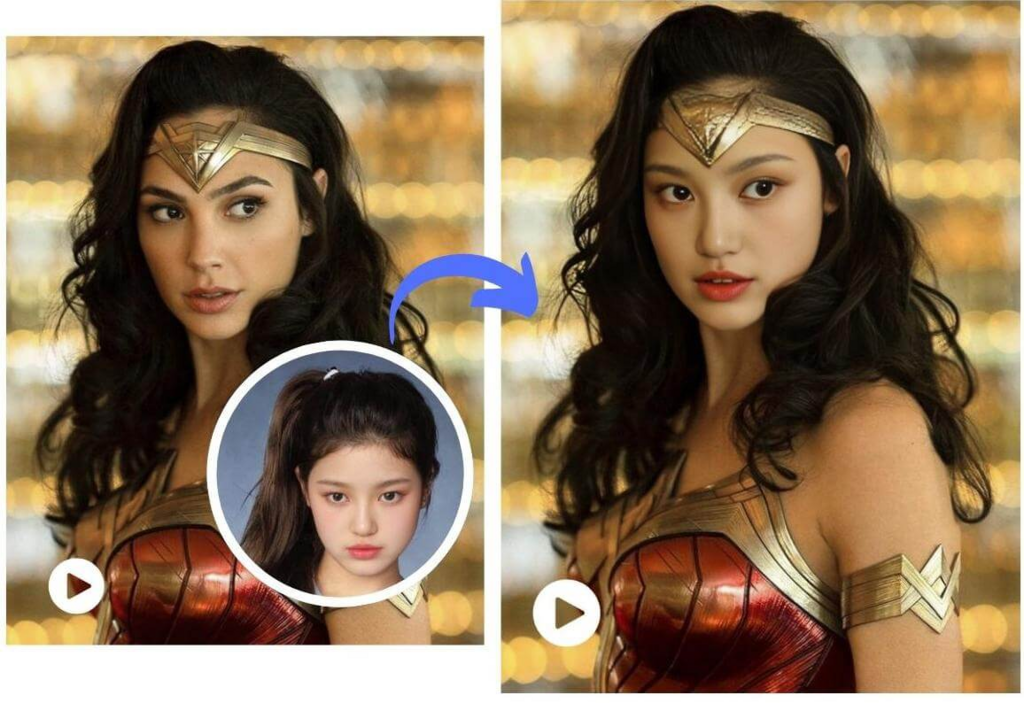
Want to create hilarious memes, stunning social media clips, or professional-looking marketing videos? You’re in the right place. Swapping faces in videos and changing backgrounds used to require expensive software and expert skills. Now, powerful AI tools make it possible for anyone to get amazing results in just a few minutes.
This guide will walk you through everything you need to know. We’ll cover how to perform a video face swap, remove a background cleanly, and offer tips to make your final cut look seamless and professional.
Why AI Video Editing is More Popular Than Ever
The demand for engaging video content is huge, but not everyone has the time or budget for complex editing suites like Adobe After Effects. This is where AI-powered online tools have completely changed the game. They handle the heavy lifting, allowing you to focus on the creative side of things. Instead of spending hours masking frames or tracking motion, you can now achieve these effects with a few simple clicks.
This shift has empowered creators, marketers, and everyday users to produce content that was once reserved for studios. The technology has become incredibly accessible and effective. For example, using The best Online Video Face Swap lets you upload a video and a photo, and the AI handles the complex process of mapping, blending, and tracking the new face onto the original footage. It’s a fast and efficient way to bring your creative ideas to life without a steep learning curve.
How to Do a Video Face Swap: A Simple Guide
Getting started with face swapping is surprisingly straightforward. The AI does most of the work behind the scenes. Here’s a breakdown of the typical process so you know exactly what to expect.
Step 1: Choose a High-Quality Source Video
The foundation of a good face swap is your original video clip. For the best results, select a video where the subject’s face is clearly visible, well-lit, and facing toward the camera.
* Lighting is Key: Avoid videos with harsh shadows or extreme backlighting, as this can make it harder for the AI to map the new face realistically.
* Clear View: The less the subject’s face is obstructed by hands, hair, or other objects, the better the final result will be.
* Resolution Matters: A higher-resolution video (like 1080p or 4K) provides more detail for the AI to work with, leading to a much cleaner and more believable swap.
Step 2: Select the Face You Want to Swap In
Next, you need a clear picture of the face you want to add to the video. This could be a photo of yourself, a friend, a celebrity, or even a character. Just like with the source video, the quality of this image is critical. A blurry or low-resolution photo will lead to a blurry and unconvincing result.
To ensure the swap looks natural, you may need to prepare the image first. Sometimes, the background of the photo can interfere with the AI’s ability to isolate the face. This is where a simple cleanup can make a huge difference. Using a tool to Remove Image Background ensures that the AI only focuses on the facial features, leading to a much more accurate and seamless blend.
Step 3: Upload and Let the AI Work
Once you have your video and your prepared face image, you just need to upload them to the online tool. The platform will then analyze both files. It identifies the facial landmarks in the video (eyes, nose, mouth) and maps the new face onto them, frame by frame.
This process can take a few minutes, depending on the length of your video and the complexity of the movement. When it’s done, you’ll be able to preview the result and download your new video.
Removing the Background from Your Videos
Changing the background of a video can instantly elevate its quality. You can replace a cluttered room with a professional office, a plain wall with a scenic beach, or create a transparent background for special effects. Like face swapping, this process has been simplified by AI.
Why Remove a Video Background?
* Professionalism: A clean, neutral, or branded background looks far more professional for business presentations, tutorials, or marketing content.
* Creativity: Place yourself anywhere in the world (or out of it). Removing the background gives you a blank canvas to add any setting you can imagine.
* Focus: By removing distracting elements from the background, you ensure that your audience’s attention remains on you, the speaker.
* Consistency: If you shoot videos in different locations, replacing the background can give your content a consistent, branded look.
How to Remove a Video Background with AI
- Choose Your Tool: Find an online video background remover. Many platforms that offer face swapping also provide this feature.
- Upload Your Video: Select the video you want to edit. For best results, use a video with good contrast between the subject and the background. A green screen is helpful but no longer necessary with modern AI.
- Process the Video: The AI will automatically detect the person or subject in the foreground and carefully cut them out from the background. This is a technique known as rotoscoping, but the AI does it automatically.
- Add a New Background: Once the original background is gone, you can either download the video with a transparent background (as a .mov or .webm file) or add a new background directly within the editor. You can choose a solid color, a stock image, or even another video.
Top Tips for Realistic and Seamless Results
While AI tools are powerful, a few extra steps can help you achieve truly believable results.
1. Match Lighting and Angles
The most common giveaway of a face swap or background replacement is mismatched lighting. If the new face is lit from the left but the scene is lit from the right, it will look unnatural. Try to choose a source face photo and a video that have similar lighting conditions. The same goes for the angle, a front-facing photo will work best on a front-facing video.
2. Use High-Quality Source Files
This cannot be stressed enough. Garbage in, garbage out. A high-resolution video and a sharp, clear face image are the most important factors for a successful edit. A blurry image will only look worse once it’s mapped onto a moving video.
3. Keep It Ethical
This technology is powerful and fun, but it’s important to use it responsibly. Avoid creating misleading or malicious content. Most platforms have clear terms of service that prohibit the creation of harmful deepfakes. Use these tools for creativity and entertainment, not for spreading misinformation.
4. Review and Refine
After the AI processes your video, take a moment to watch it closely. Look for any “artifacts” or glitches, like edges that flicker or parts of the face that don’t track perfectly. Sometimes, trying a different source photo or a slightly different video clip can solve these issues.
Common Uses for These AI Tools
Wondering how you can apply these techniques? Here are a few popular use cases that are driving the trend.
- Social Media Content: Create viral-worthy reels for Instagram, short videos for TikTok, or funny clips for YouTube. Imagine swapping your face onto a character from a famous movie scene.
- Personalized Memes and GIFs: Take classic memes to the next level by inserting your friends’ faces. It’s a great way to create inside jokes and share a laugh.
- Marketing and Advertising: Businesses can create engaging ads without a large production budget. You could replace a generic background with branded imagery or create fun social media campaigns.
- Virtual Try-Ons: E-commerce brands are exploring this technology to allow customers to see what a product (like glasses or hats) might look like on them.
Frequently Asked Questions (FAQ)
Is it hard to swap faces in a video?
Not anymore. In 2026, AI-powered online tools have made the process incredibly simple. You don’t need any technical editing skills. You just need to upload your files and let the software do the work.
What’s the best resolution for my source files?
For the best results, use a video that is at least 1080p (Full HD). For the face image, a clear photo with a resolution of at least 500×500 pixels is recommended. The higher the quality, the more detailed and realistic the final output will be.
Can I remove a video background for free?
Yes, many online tools offer free plans or trials that allow you to remove backgrounds from a certain number of videos. These are great for testing the service before committing to a paid plan, which usually offers higher resolutions and more features.
Are online video editing tools safe to use?
Reputable platforms prioritize user privacy and data security. They typically process your files on secure servers and have clear policies about how your data is handled. It’s always a good idea to review the privacy policy of any tool you use.
The Future of Content Creation is Here
Creating captivating videos is no longer a barrier for anyone. With the power of AI, you can easily perform video face swaps and remove backgrounds in minutes, not hours. These tools open up a new world of creative possibilities, whether you’re a professional marketer, a budding content creator, or just someone looking to have some fun.
By following the simple steps and tips outlined in this guide, you can start producing high-quality, engaging videos that are sure to capture attention.
Email your news TIPS to Editor@Kahawatungu.com — this is our only official communication channel
