


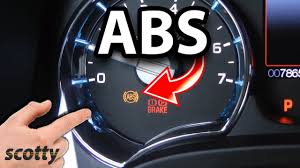
The ABS (Anti-lock Braking System) light on your dashboard is a warning that something may be wrong with your car’s braking system. While the car may still be drivable, ignoring the ABS light could lead to unsafe driving conditions. Here’s how to fix abs light on car.
- Understand What the ABS Light Means
When the ABS light comes on, it indicates that the anti-lock braking system is not functioning properly. The ABS helps prevent your wheels from locking up during hard braking, giving you better control. A lit ABS light does not always mean the entire braking system has failed—it could be a minor issue, but it still needs attention.
- Check the Brake Fluid Level
One of the most common causes of an ABS light is low brake fluid. Open the hood and check the brake fluid reservoir. If the fluid is below the “MIN” mark, top it up with the correct type of brake fluid. Make sure to use the type recommended in your car’s manual.
- Inspect the ABS Fuse
A blown ABS fuse can trigger the warning light. Locate the fuse box, usually found under the dashboard or in the engine bay. Use the owner’s manual to find the ABS fuse and check if it’s burnt. Replace it if necessary and see if the light goes off.
- Examine the Wheel Speed Sensors
The ABS relies on wheel speed sensors to monitor wheel movement. If one of these sensors is dirty, damaged, or disconnected, the ABS light may turn on. Inspect each wheel for a small sensor near the hub. Clean off any dirt or debris and make sure the wiring is intact. A damaged sensor will likely need replacement.
- Scan for Error Codes
Use an OBD2 scanner to read the car’s error codes. Plug the scanner into the port (usually under the dashboard), and it will show the specific issue causing the ABS light. This tool can save time and help you pinpoint the exact fault, such as a bad sensor, wiring problem, or module failure.
- Reset the ABS Light
If you’ve fixed the problem, the light may turn off on its own after driving for a bit. If it doesn’t, you can use the OBD2 scanner to clear the code manually. Only reset the light after confirming that the problem is solved.
Also Read: How To Eat Persimmon Fruit
Email your news TIPS to Editor@Kahawatungu.com — this is our only official communication channel
