
Close Menu
    Facebook X (Twitter) Instagram
    Facebook X (Twitter) Instagram
    KahawatunguKahawatungu
    Button
    • NEWS
    • BUSINESS
    • KNOW YOUR CELEBRITY
    • POLITICS
    • TECHNOLOGY
    • SPORTS
    • HOW-TO
    • WORLD NEWS
    KahawatunguKahawatungu
    HOW-TO

    How to Program an ET Remote

    Damaris GatwiriBy Damaris GatwiriMarch 25, 2026No Comments2 Mins Read
    Facebook Twitter WhatsApp Telegram Email
    Learning how to program an ET remote helps you control your gate, garage door, or access system with ease. ET Systems remotes
    Share
    Facebook Twitter WhatsApp Telegram Pinterest Email Copy Link

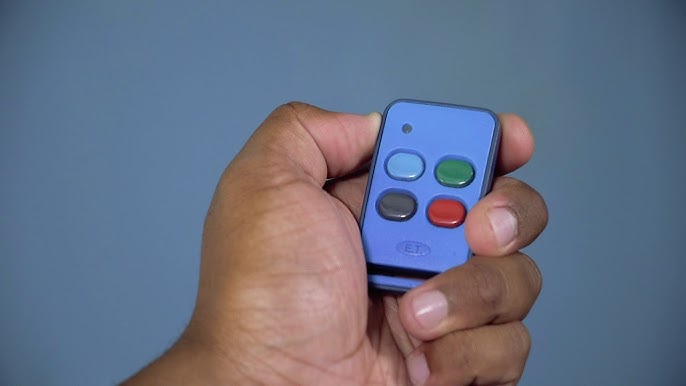
    Learning how to program an ET remote helps you control your gate, garage door, or access system with ease. ET Systems remotes are commonly used for automated gates and security systems, and they need to be paired correctly with the receiver to function.

    With the right steps, you can quickly program your remote and ensure smooth operation.

    1. Table of Contents

      Toggle
      • Locate the Receiver Unit
      • Find the Learn or Program Button
      • Activate Programming Mode
      • Press the Remote Button
      • Test the Remote
      • Program Additional Remotes

      Locate the Receiver Unit

    Start by finding the control box connected to your gate or motor.

    • Look near the gate motor or garage door system
    • Open the cover of the control box
    • Identify the receiver inside
    • Ensure the power is on

    The receiver is where the remote will be programmed.

    1. Find the Learn or Program Button

    The receiver has a button used for pairing.

    • Look for a button labeled Learn, Program, or Code
    • It is usually small and near an indicator light
    • Make sure you can access it easily

    This button activates programming mode.

    1. Activate Programming Mode

    Put the system into pairing mode.

    • Press the Learn or Program button
    • Wait for the indicator light to turn on or blink
    • This shows the system is ready to receive a signal

    Timing is important during this step.

    1. Press the Remote Button

    Now link the remote to the system.

    • Press the button on the ET remote you want to use
    • Hold it for a few seconds
    • Watch for the receiver light to blink or turn off
    • This confirms successful pairing

    The remote is now connected to the system.

    1. Test the Remote

    Check if the programming worked.

    • Stand a short distance from the gate or door
    • Press the programmed button
    • Confirm that the gate or door responds
    • Repeat if necessary

    Testing ensures everything is working properly.

    1. Program Additional Remotes

    You can add more remotes if needed.

    • Repeat the same steps for each remote
    • Assign different buttons if required
    • Ensure each remote is tested

    This allows multiple users to access the system.

    Also Read: How to Prepare Eggplant

    Email your news TIPS to Editor@Kahawatungu.com — this is our only official communication channel

    Follow on Facebook Follow on X (Twitter)
    Share. Facebook Twitter WhatsApp LinkedIn Telegram Email
    Damaris Gatwiri

    Damaris Gatwiri is a digital journalist, driven by a profound passion for technology, health, and fashion.

    Related Posts

    How to Write an Essay About Myself

    June 2, 2026

    How to Write an Appeal Letter to University

    June 2, 2026

    How to Write an Affidavit for University

    June 2, 2026

    Comments are closed.

    Latest Posts

    Where Are Todd and Julie Chrisley Now? Inside the Reality TV Couple’s Life One Year After Prison Release

    June 2, 2026

    Jim Jefferies Net Worth

    June 2, 2026

    Influencer Madeleine White Welcomes First Child After Early Delivery Scare

    June 2, 2026

    What Happens to Rue in the Euphoria Finale?

    June 2, 2026

    What Next After Sydney Sweeney’s ‘Euphoria’ Season 3 Finale? Inside Her New Career Move

    June 2, 2026

    Drama as goons attempt to free murder suspect in Narok

    June 2, 2026

    Rubio says Iran’s supreme leader alive and ‘increasingly engaging’

    June 2, 2026

    Ruto set for two-day Finland State visit

    June 2, 2026
    Facebook X (Twitter) Instagram Pinterest
    © 2026 Kahawatungu.com. Designed by Okii.

    Type above and press Enter to search. Press Esc to cancel.