


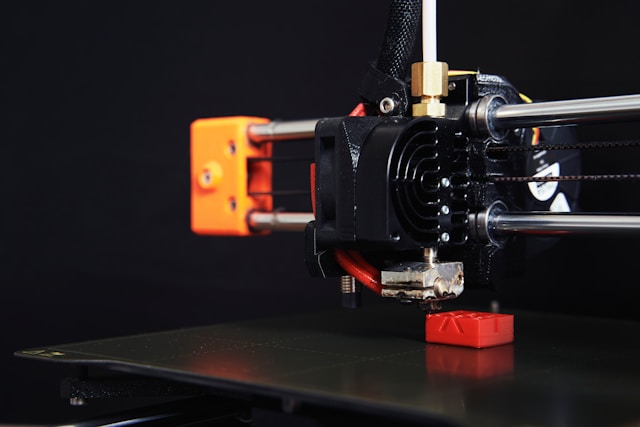
Mastering high-speed 3D printing is not about the top speed on the spec sheet. Success comes from the synergy of three core elements: a stable motion system, effective part cooling, and smart firmware and calibration. These three factors matter especially for desktop printers used in home studios, classrooms, and small businesses. All three are essential. A weakness in any area turns high speed into a marketing gimmick. Whether you are a hobbyist, an educator, or an entrepreneur seeking the best 3d printer for small business to build a small print farm, this guide explains the logic behind these features. It will help you decide which desktop FDM printer is actually worth the investment.
The Reality of High-Speed 3D Printing: Why Speed Isn’t Everything
Many beginners see a rated speed like 600 mm/s and assume faster is better. In reality, print speed is the result, while mechanical stability, thermal management, and smart software are the causes. A machine marketed at 600 mm/s may still print substantially slower in real jobs if the motion system, cooling, or extrusion system cannot sustain that pace consistently. Conversely, A well-tuned CoreXY machine can significantly reduce print times while preserving surface quality, especially on small to medium desktop jobs.
| Rated Speed | Actual Usable Speed (Preserving Surface Quality) | Common Bottlenecks |
| 250 mm/s | 150–200 mm/s | Gantry resonance, insufficient extrusion |
| 500 mm/s | 300–400 mm/s | Cooling issues, first-layer adhesion |
| 600 mm/s+ | 400–500 mm/s | Firmware input shaping, flow rate limits |
When choosing a 3D printer, look at the Max Flow Rate (mm³/s). This metric reflects the true output capacity with a 0.4 mm nozzle more accurately than top speed. Max flow rate is a useful indicator of real output capacity, and a value around 32 mm³/s is a common reference point for fast desktop FDM printers.
Feature 1: A Rock-Solid Motion System (CoreXY & Linear Rails)
Once you understand that speed is just a surface-level metric, you can focus on the first cornerstone that determines the speed ceiling: the motion system. A CoreXY structure paired with a metal frame and linear rails is currently one of the most common and mature solutions for high-speed desktop FDM printing.
Say Goodbye to Ghosting and Ringing
Ghosting and ringing are two of the most common defects in high-speed printing. Both are caused by mechanical vibrations that travel from the motion system to the model surface. In traditional i3 gantry structures, the entire Z-axis gantry can wobble during fast X-axis direction changes, which often creates visible waves on the edges once speeds move beyond 200 mm/s. CoreXY keeps the X and Y motors fixed to the chassis base with crossing belts, reducing moving mass and making high acceleration much more practical. Flashforge’s Creator 5 and Creator 5 Pro are the relevant desktop 3d printer models here: Creator 5 emphasizes multiple toolheads, multiple materials, and a zero-waste workflow, while Creator 5 Pro adds a fully enclosed design and a more controlled printing environment for users who want higher stability.
What Hobbyists Should Check Before Buying
When shopping, I recommend checking the machine’s skeleton across three dimensions. First, look at the frame material: cast aluminum or cold-rolled steel plates are superior to plastic parts. Second, check the rail type: linear rails are better than optical shafts with linear bearings. Third, look at the belt tensioning mechanism: check if it features automatic tensioning or visual adjustment. Machine weight is also an underrated indicator. Desktop machines over 14 kg generally offer better vibration resistance, while lightweight models under 8 kg often perform poorly at high speeds.
Feature 2: Advanced Part Cooling Systems
While the motion system solves the issue of machine stability, you still need to ensure the plastic can keep up. When the print head extrudes 30 mm³ of molten plastic per second, your failure rate will skyrocket if the cooling cannot keep pace, regardless of your speed advantages.
Beating Overhang and Bridging Fails
The design of the part cooling fan directly determines the success rate of overhangs and bridging. At a travel speed of 600 mm/s, a 45° overhang without sufficient cooling will deform before the plastic can solidify, resulting in a surface that looks like a melting candle. Many good high-speed 3D printers use dual-sided airflow or dedicated cooling fans to improve overhang and bridging performance rather than relying on a single airflow direction.
Making PLA and PETG Printing a Breeze
For home and education users who mostly use PLA and HS PETG, cooling is even more important than heating. HS PLA and HS PETG are formulated for faster printing, but they still depend on strong cooling, stable motion, and reliable extrusion to perform well in real-world jobs. This is why Flashforge specifically labels its high-speed filament line as HS PLA / HS PETG. The filament and the machine are designed as a single system.
Buying a 3D printer isn’t just about buying a motor; it is about buying a complete thermodynamic solution. A high-speed machine without powerful cooling is essentially just a faster scrap-metal maker.
Feature 3: Smart Firmware & Hassle-Free Setup
After the hardware is in place, the software acts as the final mile to release that potential. This is the real reason desktop high-speed printing has improved so much over the last two years.
Plug-and-Play vs. Endless Tinkering
Ten years ago, it often took half a weekend to get a 3D printer from unboxing to its first successful print. This included manual leveling, PID tuning, and flow calibration. Today, Input Shaping, Pressure Advance, and dynamic flow calibration have become standard features for high-speed machines. The Orca-Flashforge slicing software integrates these automatic calibration workflows. After unboxing, you simply run a calibration model once, and the machine remembers its own vibration frequencies and extrusion characteristics.
Why Auto-Calibration is a Game Changer for Beginners
For beginners, the most frustrating part is not the print failure itself, but not knowing why it failed. Features like fully automatic leveling, auto Z-offset compensation, and dynamic first-layer flow adjustment turn expert experience into built-in machine capabilities.
How to Choose the Best Fast Desktop 3D Printer for Home Use
Now that we have covered the three core features, let’s address the most important question: how do you choose a high-speed machine that fits your needs?
Matching the 3D Printer to Your DIY Projects
Different use cases require different priorities. The table below is a quick-reference guide based on real user feedback:
| User Profile | Recommended Build Volume | Key Features | Recommended Model |
| Beginners / Students | 220 × 220 × 220 mm | Auto-leveling, Easy to use | Adventurer 5M |
| Multi-color Creation | 256 × 256 × 256 mm | Multi-nozzle, Zero waste | Creator 5 |
| Office / Classroom | 220 × 220 × 220 mm | Enclosed body, Air filtration | Adventurer 5M Pro |
| Large Prototypes / Batch | 330 × 330 × 600 mm | Dual extrusion, Soluble support | Guider 3 Ultra |
If your core need is multi-color and multi-material printing without wasting filament, the 4 independent nozzles and FlashSwap™ workflow of the Flashforge Creator 5 is a unique solution. It increases multi-color printing speed by 500% with almost zero waste during color changes.
Hidden Costs: Filament, Upgrades, and Maintenance
Many people only focus on the price of the machine and overlook the actual cost of ownership over a year. A roll of high-quality PLA costs about 20 to 25 dollars. At two rolls per month, filament costs total about 500 dollars annually. Wear-resistant nozzles should be replaced every 500 to 800 hours. PEI steel plates are consumables, so I suggest keeping a spare. When you factor these in, the price difference between machines often balances out within the first year.
Think of high-speed 3D printing like a sports car: you need the engine, the chassis, and the electronic controls to work together. If you choose the right machine, the distance from design to finished product is only limited by your imagination.
Conclusion
If buying a 3D printer in the past was about testing the waters, 2026 is about choosing a tool. Speed matters, but the motion system, cooling capacity, and software experience determine whether the tool works for you. For small studios looking to increase productivity, entrepreneurs needing stable samples, or home users who want to start printing immediately, the value of Flashforge desktop models is clear. They do not just print fast; they print reliably, consistently, and efficiently. A good machine won’t do the creating for you, but it will ensure every creation gets closer to a finished product.

Email your news TIPS to Editor@Kahawatungu.com — this is our only official communication channel
