
Close Menu
    Facebook X (Twitter) Instagram
    Facebook X (Twitter) Instagram
    KahawatunguKahawatungu
    Button
    • NEWS
    • BUSINESS
    • KNOW YOUR CELEBRITY
    • POLITICS
    • TECHNOLOGY
    • SPORTS
    • HOW-TO
    • WORLD NEWS
    KahawatunguKahawatungu
    HOW-TO

    How Does Scan to Pay Work

    Damaris GatwiriBy Damaris GatwiriJune 4, 2026No Comments2 Mins Read
    Facebook Twitter WhatsApp Telegram Email
    How Does Scan to Pay Work
    Share
    Facebook Twitter WhatsApp Telegram Pinterest Email Copy Link

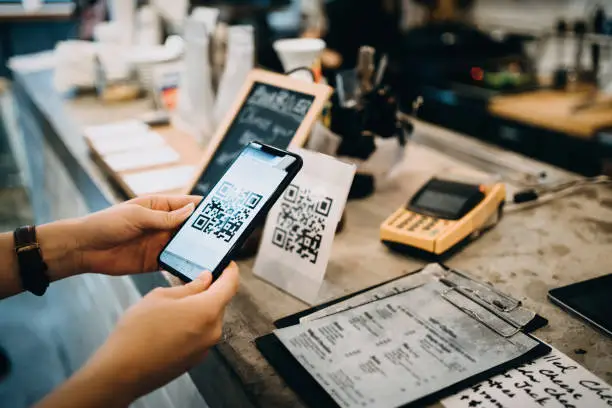
    Scan to Pay is a cashless payment method that allows you to make purchases by scanning a QR code using your smartphone. It is commonly used in shops, restaurants, online stores, and transport services. Learning how Scan to Pay works helps you make fast, secure, and convenient payments without using physical cash or cards.

    1. Table of Contents

      Toggle
      • Merchant Displays a QR Code
      • Open Your Banking or Payment App
      • Scan the QR Code
      • Enter the Payment Amount and Confirm
      • Receive Payment Confirmation
      • Safety and Convenience Benefits

      Merchant Displays a QR Code

    The process begins when the seller generates a QR code linked to their payment account.

    This code contains the payment details needed to complete the transaction.

    • QR code is shown at checkout or on a screen
    • Sometimes printed on a receipt or stand
    • Linked to the merchant’s payment system
    1. Open Your Banking or Payment App

    To pay, you need a mobile banking app or digital wallet that supports QR scanning.

    The app uses your phone camera to read the code.

    • Open your banking or payment app
    • Select the Scan to Pay option
    • Allow camera access if required
    1. Scan the QR Code

    Point your phone camera at the QR code to read the payment information.

    The app will automatically recognize the merchant details.

    • Align the QR code in the scanner box
    • Wait for the details to load
    • Confirm the merchant name
    1. Enter the Payment Amount and Confirm

    Some QR codes already include the amount, while others require you to enter it manually.

    You then confirm the payment using your PIN, fingerprint, or face ID.

    • Enter amount if needed
    • Review payment details carefully
    • Authorize the transaction securely
    1. Receive Payment Confirmation

    After successful payment, both you and the merchant receive confirmation.

    This acts as proof of payment.

    • Instant notification on your phone
    • Receipt displayed in the app
    • Merchant confirms payment received
    1. Safety and Convenience Benefits

    Scan to Pay is widely used because it is quick and reduces the need for cash handling.

    It also improves transaction security when used correctly.

    • Reduces physical contact
    • Minimizes cash handling risks
    • Provides instant transaction records

    Also Read: How to Write an Interview Dialogue

    Email your news TIPS to Editor@Kahawatungu.com — this is our only official communication channel

    Follow on Facebook Follow on X (Twitter)
    Share. Facebook Twitter WhatsApp LinkedIn Telegram Email
    Damaris Gatwiri

    Damaris Gatwiri is a digital journalist, driven by a profound passion for technology, health, and fashion.

    Related Posts

    How to Buy Bundles on Telkom

    July 16, 2026

    How to Buy Bitcoin on Luno

    July 16, 2026

    How to Buy Bank Repo Cars

    July 16, 2026

    Comments are closed.

    Latest Posts

    Kindiki concedes Ol Kalou by-election defeat as government leaders congratulate DCP candidate

    July 16, 2026

    DCI partners with Marici Kenya in fight against child trafficking

    July 16, 2026

    Storm as Jubilee Party Chairman Kemosi Accuses MP Nyakundi of Importing Voters Ahead of 2027 Polls

    July 16, 2026

    JKIA modernisation enters key phase as government signs consultant contract

    July 16, 2026

    CJ Koome calls for speedy appellate justice

    July 16, 2026

    Sifuna ousted as Senate Deputy Minority Whip, Eddy Oketch takes over

    July 16, 2026

    Actor Sam Neill died from pneumonia, agent confirms

    July 16, 2026

    Ruku announces salary increase for public servants

    July 16, 2026
    Facebook X (Twitter) Instagram Pinterest
    © 2026 Kahawatungu.com. Designed by Okii.

    Type above and press Enter to search. Press Esc to cancel.